


Who can do this: For a booking with a refundable deposit: Owner, Administrator and Finance. For a booking with no deposit (card saved instead): Owner, Administrator, Finance, Programs and Front desk. Programs and Front desk see a note on deposit bookings asking someone who can issue refunds to close it out. Fundraiser and Viewer users don't see the close-out.
Quick steps: Rentals › "Bookings" › the "Completed" booking › "After the event" › "Return deposit", or "Keep part ($)" › "Reason" › "Keep … and return the rest". No deposit: "Close with no damage charge", or "Damage charge ($)" › "Reason" › "Charge … to the payment method on file".
Before you start
- You need one of the roles above.
- The event must be over. Once a day, Clerestory marks a "Confirmed" booking whose last date has passed as "Completed". The close-out appears only then.
- A security deposit (or refundable deposit) is money the renter paid up front, to be returned after the event if nothing was damaged.
- Some spaces take no deposit. Instead the renter's card or bank account is saved, so you can charge for damage. The booking's "Quote" box then says "No deposit; card saved".
- Check the space after the event, so you know whether to keep anything.
Find the booking
Page: /dashboard/rentals/bookings/<bookingId>
- In the left-hand menu, under "Programs & Sales", click "Rentals".
- In the row of tabs under the "Rentals" heading, click "Bookings".
- In the search box ("Search references and renters"), type the renter's name or the booking reference, for example B-1042.
- Click the booking's reference. The booking's page opens.
- Check the status at the top right. It must say "Completed".
- Scroll down past "Payments", "Agreement" and "Insurance" to "After the event".
Return the whole deposit
Page: /dashboard/rentals/bookings/<bookingId>
- Under "After the event", read "Deposit held:", for example "Deposit held: $250.00".
Important: Clicking "Return deposit" refunds the whole deposit right away to the card or bank account the renter paid with, emails the renter, and closes the booking. It can't be undone.
- Click "Return deposit".
- You'll see "Booking closed." The status changes to "Closed". That means it worked.
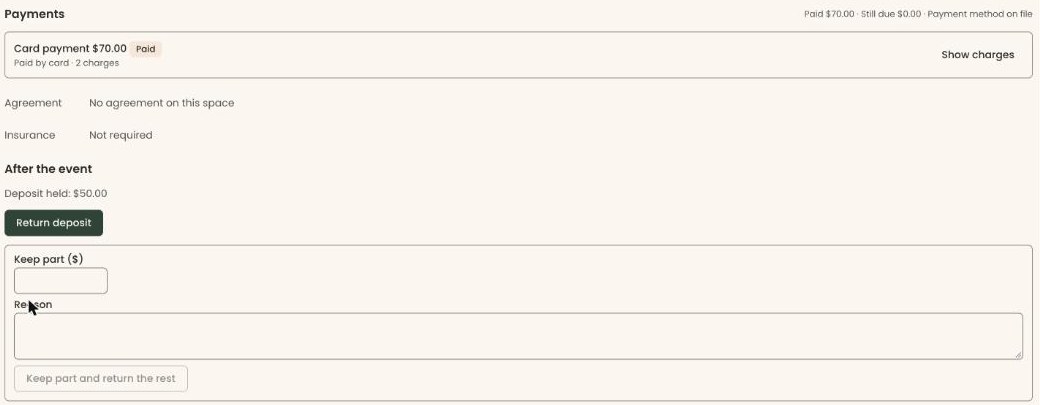
Keep part of the deposit
Use this when there was damage or extra cleaning.
- Under "After the event", in "Keep part ($)", type the amount to keep, for example 75.
- In "Reason", type why, for example "Broken chair replaced". The renter will read this in their email.
- If you see "You cannot keep more than the deposit held.", lower the amount.
Important: Clicking "Keep … and return the rest" keeps the amount you typed, refunds the rest to the renter right away, emails them what was kept and why, and closes the booking. It can't be undone.
- Click the button under "Reason". Before you type an amount it reads "Keep part and return the rest". With an amount it reads, for example, "Keep $75.00 and return the rest". It stays grayed out until you type both an amount and a reason.
- You'll see "Booking closed." The status changes to "Closed". That means it worked.
To keep the whole deposit, type the full "Deposit held" amount in "Keep part ($)".
A deposit paid by cash, check or bank transfer
If the deposit was marked paid another way, it can't go back to a card.
- Under "After the event", read the note: "This deposit was not paid by card, so it can't go back to a card."
- Return the money to the renter yourself.
- Check the box under the note, for example "I will hand back $250.00 myself", or "I will return $250.00 by bank transfer". You can't return the deposit until you do.
Important: "Return deposit", or the keep-part button, records the money as refunded, emails the renter and closes the booking. It can't be undone.
- Click "Return deposit", or keep part as above. Clerestory records the money as refunded.
The renter is emailed in the same way.
Close a booking with no deposit
Page: /dashboard/rentals/bookings/<bookingId>
If nothing was damaged:
Important: "Close with no damage charge" closes the booking right away. You can't charge for damage afterwards, and it can't be undone.
- Under "After the event", click "Close with no damage charge".
- You'll see "Booking closed." The status changes to "Closed". That means it worked. Nothing is sent to the renter.
To charge for damage:
- In "Damage charge ($)", type the amount, for example 120.
- In "Reason", type what it is for, for example "Stained carpet cleaned".
Important: Clicking "Charge … to the payment method on file" takes the money from the renter's saved card or bank account right away. There is no confirmation box.
- Click the red button under "Reason". It reads "Charge $120.00 to the payment method on file", with your amount. It stays grayed out until you type an amount and a reason.
- You'll see "Booking closed." The status changes to "Closed" and a "Damage" charge appears under "Payments". That means it worked.
If you see "There is no payment method on file for this booking, so damage cannot be charged here.", the renter has no saved card. Close with no damage charge, and ask the renter to pay you another way.
If a damage charge doesn't go through
- "The payment method on file was declined. The booking stays open." The renter is emailed that the payment failed. Ask them for another way to pay. Under "Payments", use "Mark paid" on the "Damage" row once they pay. Then click "Close with no damage charge".
- "The bank payment has started…" The money takes a few business days to clear. Once the "Damage" row shows "Paid", click "Close with no damage charge".
- "Stripe has not answered yet. The booking stays open." Reload the page after a minute and check the "Damage" row before trying again.
Special cases
- No "After the event". The booking isn't "Completed" yet, or your role can't close it out. A booking that was never confirmed can't be closed out.
- "Returning a deposit is a refund. Ask someone who can issue refunds to close this booking out." Your role can't refund. Ask an Owner, Administrator or Finance user.
- A reminder task. In Settings › "Task Automation", the "Rental Close-Out Due" rule creates a task to close out each rental once its last date has passed. It is off until you turn it on.
- The renter's email. Returning or keeping a deposit emails the renter. Your organization can turn off the "Rental cancellations and deposits" email. See See which emails go out automatically, and turn one off.
- "That did not work. Nothing was changed." Try again. If it repeats, reload the page.
Buttons to avoid
- "Refund" on the deposit's row under "Payments" refunds the deposit but doesn't close the booking. Use "After the event" instead.
- "Return deposit" returns all of it. To keep some, use "Keep part ($)" and the button under it.
If you make a mistake
Closing out can't be undone in the screens. A refund or damage charge has already gone through. A closed booking has no "After the event" box.