


Who can do this: Owner, Administrator and Fundraiser can turn emails on and off. Finance, Programs and Viewer can open the page and see the list, but the switches are grayed out. Front desk doesn't see the page.
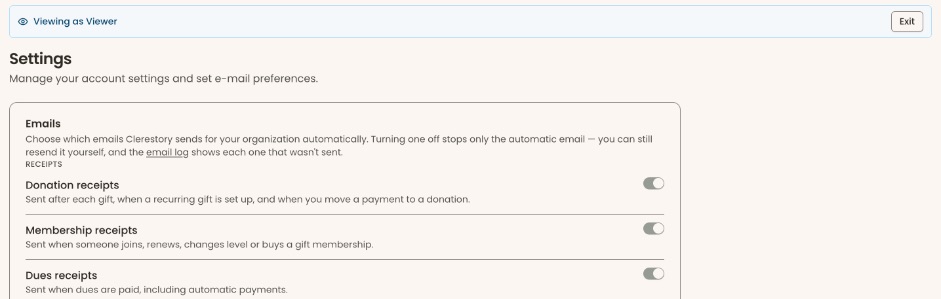
Quick steps: Settings (under "Tools" in the left-hand menu) › Emails › find the email › click its switch.
Before you start
- You need one of the roles above.
- An automatic email is one Clerestory sends by itself when something happens, such as a receipt after a gift. Emails you send on purpose (a newsletter, or a "Resend" button) are not on this page.
- Every automatic email starts out on.
Turn an automatic email off (or back on)
Page: /dashboard/settings/emails
- In the left-hand menu, near the bottom under "Tools", click "Settings" to open the group. If you can't see it, scroll down inside the menu.
- A list opens under "Settings". Click "Emails" (scroll the menu down again if needed).
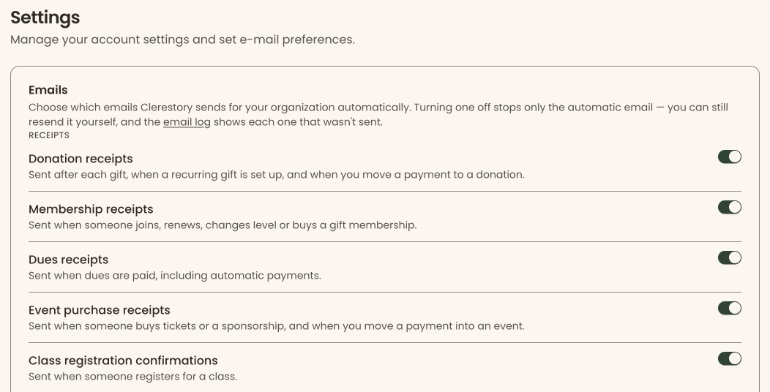
- The page is headed "Settings", with a box titled "Emails". The emails are grouped under small capital-letter headings such as "RECEIPTS" and "REMINDERS".
- Find the email you want. Each one shows its name in bold and, underneath, when it is sent.
- At the far right of that email's line is a switch. A switch that is filled in and pushed to the right is on.
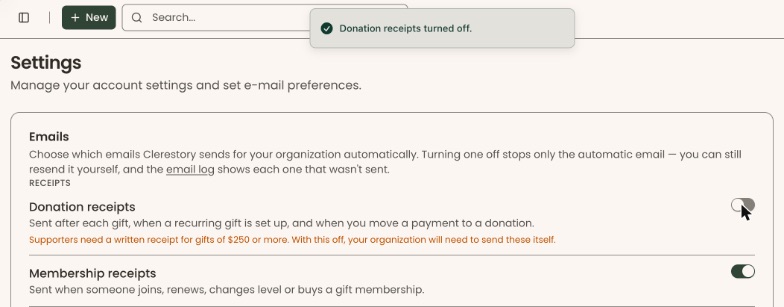
Important: turning an email off takes effect straight away. There is no "Save" button and no "Are you sure?" step. - Click the switch.
- You'll see a message such as "Donation receipts turned off." That means it worked. Click the switch again to turn it back on ("Donation receipts turned on.").
If you see "Couldn't save that change. Please try again.", wait a moment and click the switch again.
If the page says "Couldn't load your email settings. Please refresh the page.", reload the page in your browser.
What turning an email off does
- It stops only the automatic email. A staff member can still send it by hand, for example with a "Resend" button on a payment.
- Each email that wasn't sent because it was off shows in the email log. Click the underlined "email log" in the text at the top of the "Emails" box, or in the left-hand menu click "Settings", then "Email Log".
- The switch is for your whole organization. Some events, classes, forms and other items can also turn an email off just for themselves. They can't turn back on an email that is off here.
Every automatic email
Receipts
| When it is sent | |
|---|---|
| Donation receipts | After each gift, when a recurring gift is set up, and when you move a payment to a donation. |
| Membership receipts | When someone joins, renews, changes level or buys a gift membership. |
| Dues receipts | When dues are paid, including automatic payments. |
| Event purchase receipts | When someone buys tickets or a sponsorship, and when you move a payment into an event. |
| Class registration confirmations | When someone registers for a class. |
| Shop receipts | After a shop purchase. |
| Admission receipts | After an admission purchase. |
| Rental receipts | When a renter's booking is confirmed, and after each later rental payment. |
| Donor-advised fund grant details | When a supporter recommends a grant from their donor-advised fund on a donation form. It gives them the details they need to finish it. It is not a receipt. |
Tickets and registrations
| When it is sent | |
|---|---|
| Event tickets | Each guest's ticket with a QR code, after purchase and when a guest's name or email changes. |
| Raffle ticket numbers | After someone buys raffle tickets. |
| Raffle winner notices | To the winner when you draw a raffle. |
| Class cancellation notices | When a class registration is canceled. |
| Class transfer notices | When you move someone to a different class. |
| Volunteer sign-up confirmations | When someone signs up for a standing volunteer shift on your Volunteer with us page. |
| Rental request updates | To a renter when their rental request is received, approved (with their booking link) or declined. |
Reminders
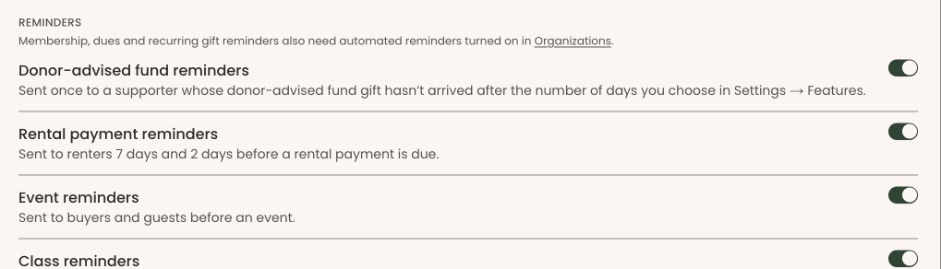
The page notes that membership, dues and recurring gift reminders also need automated reminders turned on in Settings › Organizations (see "Special cases").
| When it is sent | |
|---|---|
| Donor-advised fund reminders | Once, to a supporter whose donor-advised fund gift hasn't arrived after the number of days you choose in Settings › Features. |
| Rental payment reminders | To renters 7 days and 2 days before a rental payment is due. |
| Event reminders | To buyers and guests before an event. |
| Class reminders | Before an upcoming class session. |
| Membership renewal reminders | Before a membership is due to renew. |
| Dues reminders | Before dues are due and when they are unpaid. |
| Upcoming recurring gift notices | Before a recurring gift is charged. |
| Expiring card notices | When the card on file will expire before the next renewal. |
| Rental insurance reminders | To a renter a week before their booking, when the space requires insurance and none has been accepted. |
Payment issues
| When it is sent | |
|---|---|
| Declined payment notices | When a recurring gift, membership renewal, dues payment or rental payment is declined. |
| Payment recovered notices | When a declined payment goes through on a later try. |
Membership changes
The page notes that membership expired notices also need automated reminders turned on in Settings › Organizations.
| When it is sent | |
|---|---|
| Membership expired notices | When a membership ends. |
| Dues waived notices | When you waive someone's dues. |
Refunds
| When it is sent | |
|---|---|
| Refund confirmations | When a payment is refunded. |
| Automatic refund notices | When a payment arrives after its registration or membership was canceled, and is refunded automatically. |
| Rental cancellations and deposits | When you cancel a rental booking or one of its dates, and when you return or keep a security deposit. |
Waitlist
| When it is sent | |
|---|---|
| Waitlist offers | When a spot opens up. If this is off, people won't know about their offer unless you tell them. |
| Waitlist offer expired notices | When a waitlist offer runs out. |
Gala and auctions
| When it is sent | |
|---|---|
| Gala statements | To each household once its gala charges are paid, and again if they are corrected. You can still send one from the statements list. |
| Outbid notices | Tells a guest they have been outbid on a silent auction item. |
Tributes and gift memberships
| When it is sent | |
|---|---|
| Tribute notices to the family | Tells the family when someone gives in memory or in honor of a person. |
| Gift membership notices | Tells the recipient that someone gave them a membership. |
To your staff
These go to your team, not to supporters.
| When it is sent | |
|---|---|
| New payment alerts | When a gift, membership, dues payment, order or admission sale comes in. |
| Class activity alerts | When someone registers for, cancels, transfers, applies to or is refunded for a class. |
| Payment problem alerts | When a membership renewal is declined, a rental payment fails after every retry, or a late payment is refunded automatically. |
| Refund alerts | When a payment is refunded. |
| Rental booking alerts | When a renter confirms a booking. |
| Volunteer sign-up alerts | When someone signs up for a standing volunteer shift. |
| Rental request alerts | When someone sends a rental request or books an instant-booking space. |
| Rental insurance alerts | When a renter uploads an insurance certificate. |
| Supporter wall review alerts | When a gift's message or chosen name is waiting for approval before it shows on a supporter wall. |
| Task assigned | To a team member when a task is assigned to them. |
| Daily task digest | A daily summary of overdue and upcoming tasks. |
Always sent (no switch)
At the bottom of the page: "Always sent: sign-in codes, password resets, email verification, team invitations, supporter portal sign-in links, and security and dispute alerts." These can't be turned off.

Special cases
- Tax receipts. If you turn off "Donation receipts", "Membership receipts", "Event purchase receipts" or "Gala statements", a warning appears under it: "Supporters need a written receipt for gifts of $250 or more. With this off, your organization will need to send these itself."
- Reminders need a second switch. Membership, dues and recurring gift reminders, and membership expired notices, only go out if "Automated reminder emails" is also on. It is on the Settings › Organizations page, in the "Reminder Settings" box. Only an Owner or Administrator can change it. Click the "Organizations" link in the note on the Emails page to go there.
- Staff alerts for one person. The note under "To your staff" links to "Team settings". There, each team member has their own "Staff alerts" switch. See the guide "Remove a user, answer access requests, and set staff alerts".
- "Rental booking alerts" and "Rental request alerts" share one switch. Turning either one off turns both off.
If you make a mistake
Click the switch again to turn the email back on. Emails that weren't sent while it was off are not sent later. The email log shows which ones were missed, and you can resend them by hand.