


Who can do this: Owner, Administrator, Finance and Fundraiser. Programs can run the report and see the "Claim as Gift" link, but the claim page says "You don't have access to this page — ask an Administrator". Viewer sees Reporting but can't run reports. Front desk doesn't see Reporting.
Quick steps: Reporting › Templates › "Payout Transactions" › "Run Report →" › a row marked "Not recorded in Clerestory" › "Claim as Gift" › "Supporter email", names › "Record as a gift".
Before you start
- You need the Owner, Administrator, Finance or Fundraiser role.
- Know who made the payment: their email address, and their first and last name if you have them. Your Stripe Dashboard may show these.
- A deposit (also called a payout) is a transfer Stripe makes to your bank. One deposit can hold many payments.
- A payment "Not recorded in Clerestory" is in a deposit, but Clerestory has no gift or sale for it. Until you claim it, it isn't counted as fundraising income.
- For running and filtering reports in general, see Run a built-in report, then filter, sort and choose columns.
Find the payment
Page: /dashboard/reporting/templates/payout-transactions
- In the left-hand menu, under "Tools", click "Reporting" to open its list.
- Click "Templates".
- Under "Built-in Reports", scroll down to the "Transactions" group and find "Payout Transactions".
- Click "Run Report →" at the bottom of its card. The report opens. It starts on last month's deposits.
- To look at another period, change the date range at the top of the report.
- Look along each row for the "Attribution" column. Rows to claim say "Not recorded in Clerestory".
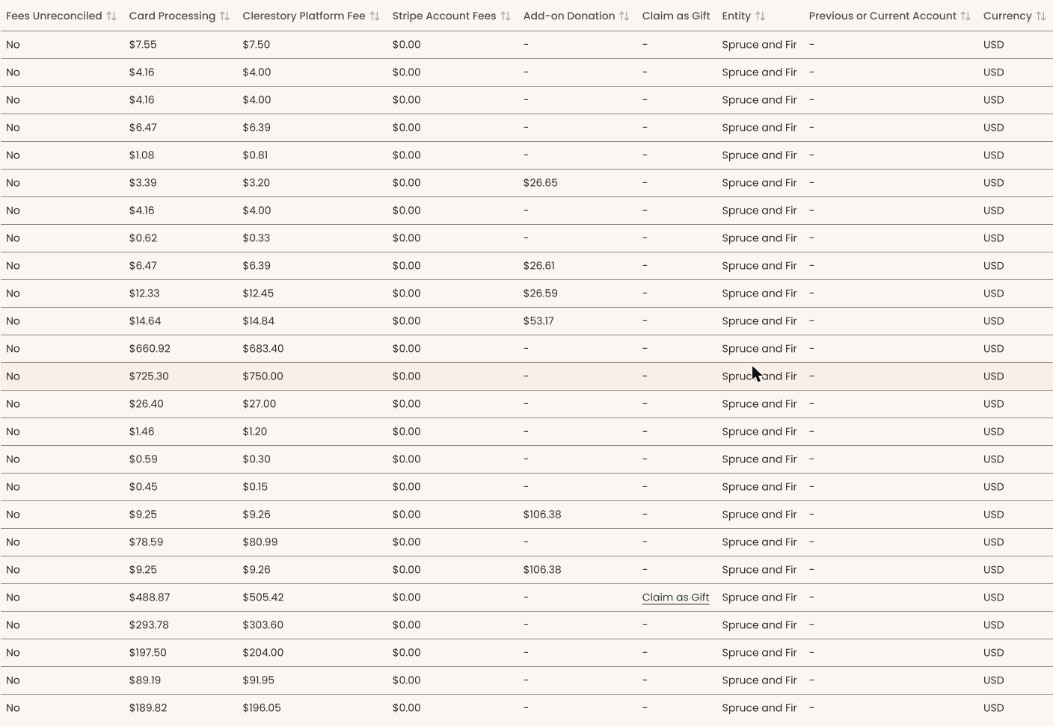
- On that row, find the "Claim as Gift" column. It's toward the right; scroll sideways if you need to. A row that can be claimed shows an underlined "Claim as Gift" link. Other rows show "-".
- The report shows 25 rows a page. The box above the table says how many payments are "Not Recorded in Clerestory". If you don't find them all, click "Next" at the bottom right to see the next page.

Claim it as a gift
Page: /dashboard/reporting/claim-deposit-payment?balanceTransactionId=<id>
- Click "Claim as Gift" on the row. A page opens called "Claim a payment as a gift".
- Check the "Amount", "Net after fees", "Description" and "Stripe reference". These come from Stripe and can't be changed.
- In "Supporter email", type the email address of the person who gave. This is required.
- In "First name" and "Last name", type their name.
- "Email the supporter a receipt" starts checked. To send no receipt, uncheck it.
Important: With the box checked, clicking "Record as a gift" emails the supporter a receipt. If no supporter has that email, Clerestory adds a new supporter. The gift can't be removed in the screens afterwards.
- Click "Record as a gift".
- You'll see "Payment recorded as a gift." and you're taken back to the "Payout Transactions" report. That means it worked. The row no longer says "Not recorded in Clerestory".
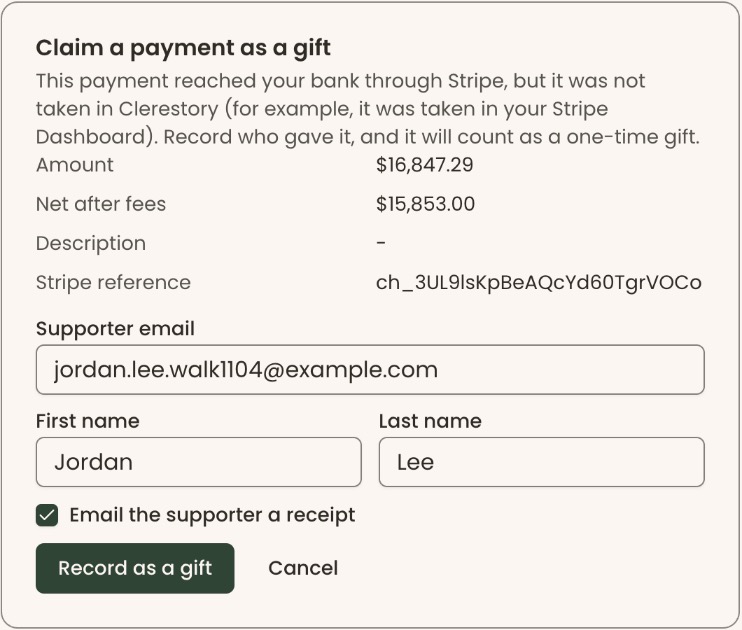
"Record as a gift" can't be clicked until "Supporter email" has something in it. To leave without recording, click "Cancel".
If it doesn't work
The claim page shows a message instead of the form when a line can't be claimed:
- "This payment is already recorded in Clerestory." Someone has already recorded it, or Stripe told Clerestory about it meanwhile. There's nothing to do.
- "Only a payment can be claimed as a gift." The line is a refund, fee or transfer, not a payment.
- "Only a payment of more than zero can be claimed as a gift."
- "This payment was taken at a gala. The gala records it, so it cannot be claimed as a gift."
- "We could not find this payment." or "No payment was selected." Go back to the report and click "Claim as Gift" again.
If you see "We could not record this payment. Please try again." after clicking "Record as a gift", nothing was saved. Try again.
What happens to the gift
- It's recorded as a one-time donation, at the amount Stripe shows.
- It's matched to the supporter with that email. If there is none, a new supporter is added with the name you typed.
- Stripe's fees are copied onto the gift, so it matches the deposit.
- It now counts in giving totals and reports like any other gift.
If you make a mistake
- Wrong supporter or claimed by mistake: this can't be undone in the screens. Check the email and name carefully before clicking "Record as a gift".
- Receipt sent by mistake: it can't be called back.