

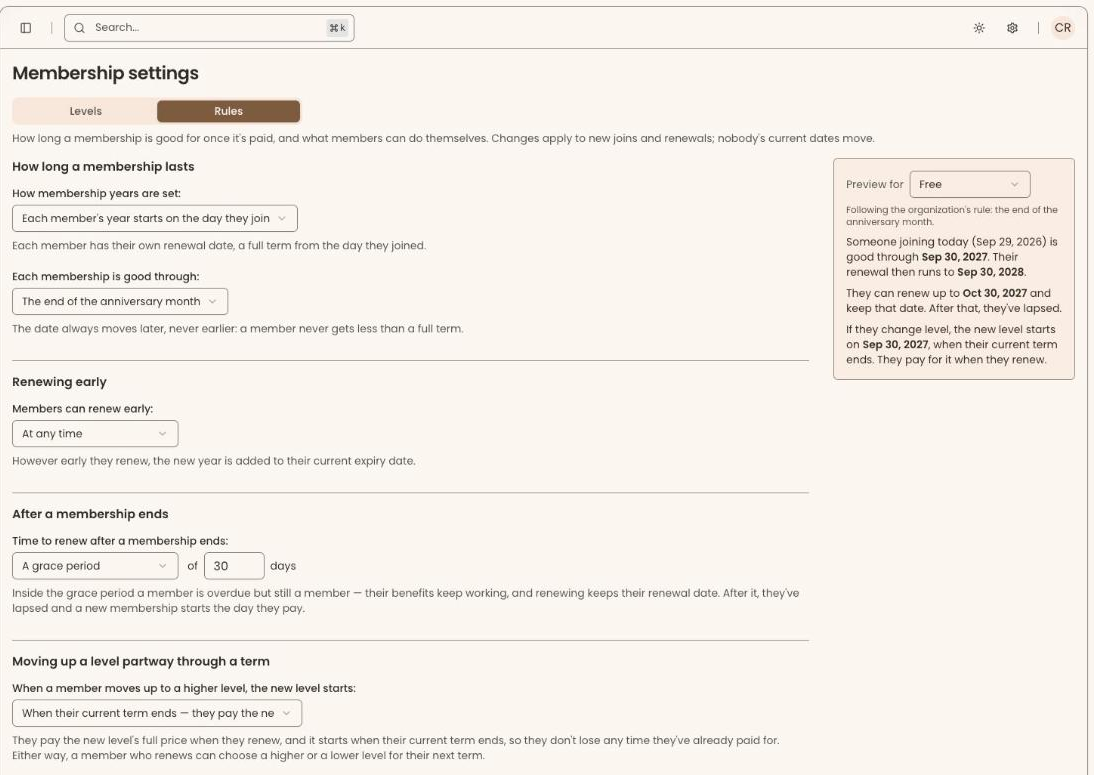

You will find the rules under Membership settings, on the Rules tab. Nothing changes until you choose, and when you do, the new rules apply to new joins and renewals only. Nobody's current dates move.
How long a membership lasts
First, choose how membership years are set.
- Each member's year starts on the day they join. A rolling year, the most common choice for museums and gardens.
- Everyone has the same dates. One shared membership year, starting on the month and day you pick, which suits associations, societies and clubs.
With a rolling year, you can also round the end date forward so renewals line up with your month-end reporting. Someone who joins on September 10 can be good through September 10 the following year, through September 30, or through October 1.
Members who join part way through the year
A shared year raises an obvious question: what does someone get if they join in September and everyone renews in January? You choose.
- The same term and price as everyone else, ending with everyone else's.
- A longer first term. They pay full price and their first term runs through the end of the following year, if they join on or after a cut-off date you set.
- A lower first price. They pay only for the whole months left, counting the month they join, never more than the full price, and renew with everyone else.
With a year ending December 31, someone joining on September 10 would, with a longer first term, be a member through December 31 of the following year. With a lower first price, they would pay for four months and renew in January.
Renewing early
By default, members can renew at any time, and the new year is added to the end of their current one, so renewing early never costs them a day. If you would rather renewals open only near the end of a term, set the number of days before expiry.
After a membership ends
Add a grace period of up to a year. During it, the member is shown as overdue but their benefits keep working, and when they renew they keep their original anniversary. With a 30-day grace period, a member whose membership expired on October 17 and who pays on November 5 is good through the following October 17.
If someone comes back after the grace period, their new membership starts on the day they pay, and their original "member since" date is kept.
Moving up a level
Decide what happens when a member moves up mid-term.
- Immediately: they pay the difference in price, get the new level straight away, and keep the same end date.
- When their current term ends: they pay the new level's full price for the next term.
A separate switch lets members move up a level online themselves. Moving down always takes effect at renewal. Staff can renew or change a member's level from the member's record.
Levels that work differently
If one level needs a different end-date rule from the rest, set it on that level. Everything else follows the organization's rules.
See the dates before you save
The preview beside the rules shows, level by level and in plain dates, what a member joining or renewing today would get, including the price a late joiner would pay against the level's full price. When it looks right, save, and the rules apply to every new term from then on. Each term remembers the rules it was created under.
Auto-renew and reminders
Auto-renewal always follows on from the date a member is paid through, so it never skips or overlaps a term, and Clerestory, not your payment processor, keeps the dates. Renewal reminders are set per level.
What it does not do, yet
Lifetime and honorary memberships are not built yet, and neither is pausing a membership or switching between monthly and annual payment. Moving down a level mid-term is not refunded; it takes effect at renewal. A shared membership year cannot be combined with end-date rounding, because the shared year already sets the end date.
What it costs
Nothing extra. Membership rules are part of every Clerestory account.
Frequently asked questions
Can membership software handle both rolling and fixed membership years?
Yes. Clerestory lets each member's year start on the day they join, a rolling year that is the most common choice for museums and gardens, or gives everyone the same dates from a month and day you pick, which suits associations, societies and clubs.
How should a non-profit handle members who join partway through the membership year?
With a shared membership year, Clerestory lets you choose: the same term and price as everyone else, a longer first term for anyone joining on or after a cut-off date, or a lower first price that charges only for the whole months left, never more than the full price.
Can members keep their benefits during a grace period after their membership expires?
Yes. Clerestory allows a grace period of up to a year, during which the member is shown as overdue but their benefits keep working. When they renew within the grace period, they keep their original anniversary.
What happens when a member upgrades to a higher level mid-term?
Clerestory lets you choose: the upgrade takes effect immediately, with the member paying the difference and keeping the same end date, or when the current term ends, at the new level's full price. Moving down a level always takes effect at renewal.
Do new membership rules change existing members' dates?
No. In Clerestory, new membership rules apply to new joins and renewals only, and nobody's current dates move. Each term remembers the rules it was created under.
Does Clerestory support lifetime or honorary memberships?
Not yet. Lifetime and honorary memberships are not built yet in Clerestory, and neither is pausing a membership or switching between monthly and annual payment.