


Venue rentals
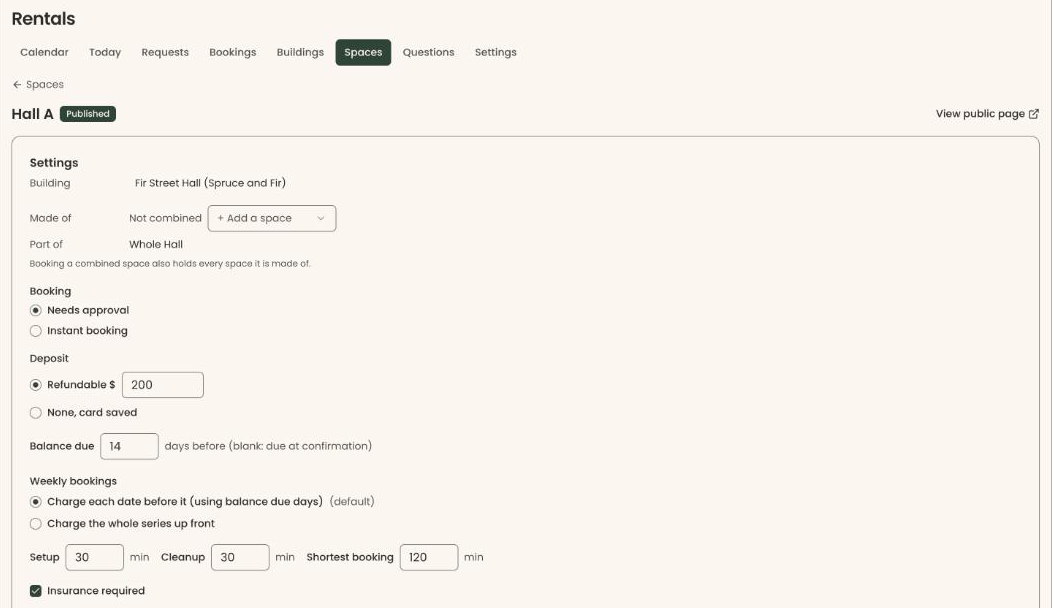
Each room has photos, a capacity and its own rates: public, member and non-profit, weekday or weekend, by the hour, half day, full day or a flat fee. Add extras, setup time and cleanup time.
Rent Hall A, Hall B or the whole hall. Two renters can never hold the same space at once, setup and cleanup time included.
A public page of your rooms with a month of availability, to link to or embed on your own website. Requests outside your opening hours are turned away.
Approve or decline each request from a queue, or switch on Instant Booking for a room to skip the review. Ask renters your own questions on the request.
A week view for each building, a month view for each room, a Today schedule for whoever opens up, and blocked time.
From their booking link, renters confirm a code sent to their email, sign the rental agreement online, upload a certificate of insurance if you ask for one, and pay by card.
Take a refundable deposit, or keep a card on file with Stripe for damage. Afterwards, return the deposit, keep part of it with a reason, or charge for damage.
Bill a weekly series up front or date by date, as you choose for each room. Payment schedules send a reminder before each charge, and cash, checks and bank transfers can be marked paid.
Rental income by building, room and month, occupancy and deposits held. Rental income never counts toward giving or appears on a tax receipt, and each building can sit under its own legal entity, Stripe account and QuickBooks class.
How a booking works
They browse your rooms and a month of availability on your page or your own website, and request one date or a weekly series, with their guest count, extras and answers to your questions.
The request lands in your queue to approve or decline. Rooms with Instant Booking skip this step.
From the emailed booking link, they confirm a code sent to their email, sign the agreement, upload insurance if you ask for it, and pay by card.
After the event, return the deposit, keep part of it with a reason, or charge for damage.
Honest limits
Bookings live on Clerestory's rental calendar. They do not sync to Google Calendar or Outlook.
Clerestory does not list your rooms on Peerspace or other marketplaces. Renters book from your own page.
Renters pay by card from their booking link, on a payment schedule if you set one. Clerestory does not send invoices with net-30 terms.
Supporters can cover the fees on gifts, memberships and tickets. That option is not offered to renters.
Renters manage a booking from the emailed booking link. There is no separate renter account or portal.
Your events and classes are not linked to rooms. When you need a space yourself, block the time on the rental calendar.
No. Rentals is included in the same 3% platform fee as every other Clerestory feature, with no license fee, seats or modules. It is off by default, and you switch it on in Settings.
Yes. Each room can have public, member and non-profit rates, for weekdays or weekends, by the hour, half day, full day or a flat fee.
Yes. Switch on Rentals in Settings and list your buildings and rooms with photos, capacity and rates. Renters see a month of availability on a public page, send a request, sign the rental agreement online and pay by card. Staff approve or decline requests, take security deposits and see every booking on one calendar. Rentals costs nothing extra: it is part of the same 3% as every other feature.
Yes. Each building can belong to a different legal entity, with its own Stripe account and its own QuickBooks class.
You choose for each room: a refundable deposit, or a card kept on file with Stripe so damage can be charged afterwards. After the event, return the deposit, keep part of it with a reason, or charge for damage. Clerestory never holds card numbers.
Yes. Renters can request a weekly series, and you choose for each room whether the series is billed up front or date by date.
No. Rental income is its own category. It never counts toward giving totals or appears on a tax receipt, and reports show it by building, room and month.