

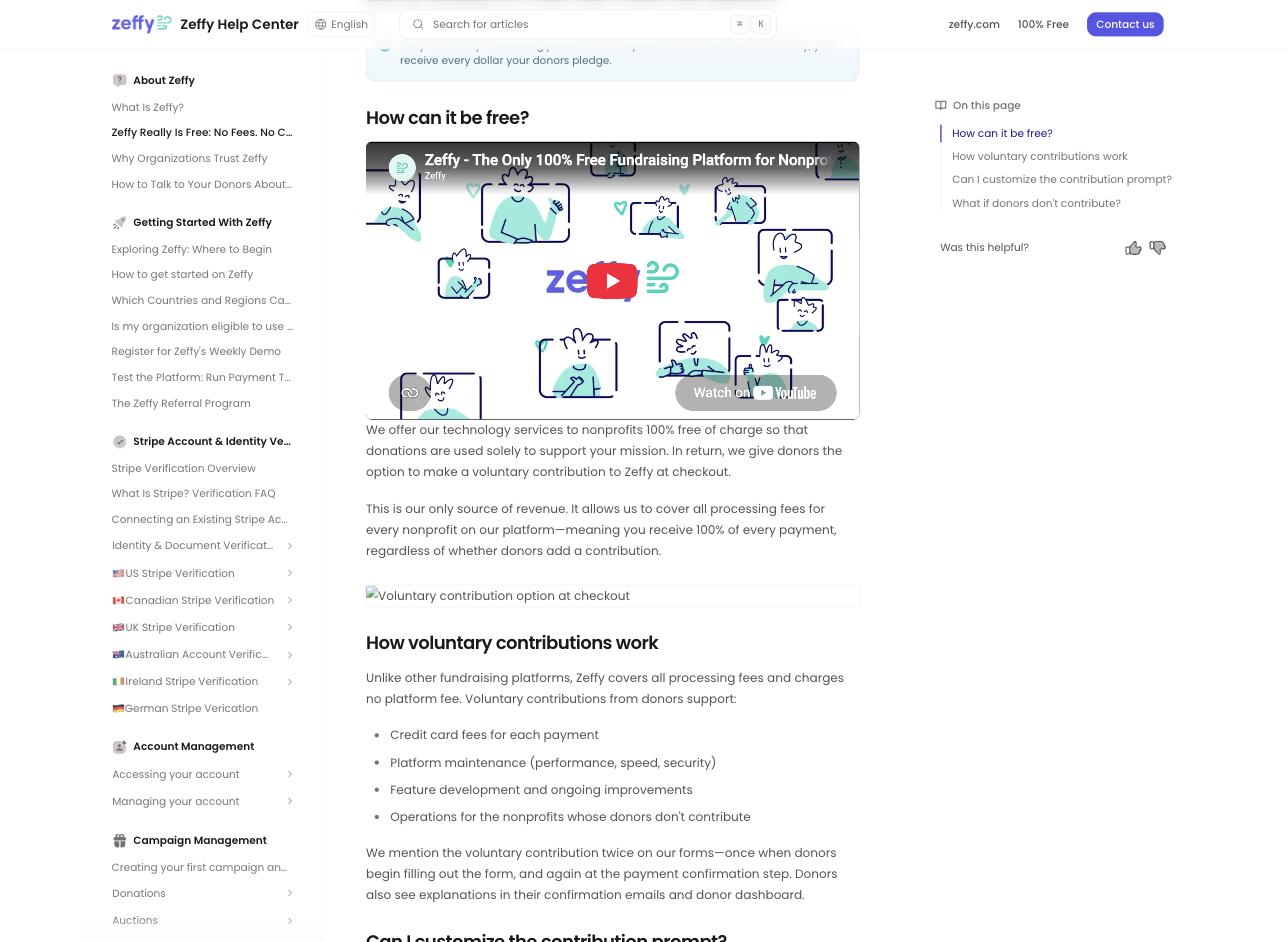
Zeffy: the "How can it be free?" section of Zeffy's own help center, read on 3 September 2026, explaining the voluntary contribution asked of donors at checkout.
Most comparison pages are written by the company that wants to win, which is why almost none of them are useful. This one is too, so here is how we have tried to make it worth reading: every claim about Zeffy below is quoted from Zeffy's own help center, with the date we read it, and where Zeffy matches us we say so plainly rather than leaving the row out.
Every screenshot on this page is labeled with whose product it shows.
Nothing, to your organization. That is not marketing spin and we will quote it rather than characterize it. Zeffy's help center says: "Zeffy is the only fundraising platform for nonprofits that is 100% free." Processing is covered too: their own page states that the contribution model "allows us to cover all processing fees for every nonprofit on our platform".
So the honest headline is that on a like-for-like online donation, Zeffy costs your organization less than we do. There is no version of this page where that is not true, and any comparison that buries it is not worth your time.
From your donors. Zeffy is direct about this: "In return, we give donors the option to make a voluntary contribution to Zeffy at checkout." and "This is our only source of revenue."
Three details from their documentation are worth knowing before you decide how you feel about that, because they are the ones that determine what your supporters actually experience.
The ask appears twice. "We mention the voluntary contribution twice on our forms—once when donors begin filling out the form, and again at the payment confirmation step."
You cannot change it or turn it off. Asked directly whether the prompt can be customized, Zeffy answers: "The wording and suggested amounts in the contribution dropdown cannot be customized."
The suggested amount is set by an algorithm, not by you. "The suggested percentage fluctuates based on the transaction amount—the larger the donation, the lower the percentage."
And it works: Zeffy publishes that "Around 60% of donors choose to contribute". A donor who declines costs the organization nothing, which Zeffy also states plainly.
Whether that trade is a good one is a judgment about your donors and your board, not a fact we can settle for you. What we can tell you is that it is a real trade, and it happens inside your checkout, in wording you do not control.
3% per transaction, and that is the whole of our price. No license fee, no per-seat pricing, no modules, no support tiers, no minimum and no contract. Stripe processes the payment on your own Stripe account at 2.2% + $0.30, the non-profit rate our customers receive.
Supporters can cover both fees at checkout, ours and Stripe's. Across every payment we processed through August 2026, our customers paid an effective 1.65% platform fee on our 3% once supporters had covered their share, and about 1.5% in Stripe processing.
And 3% is a ceiling, not a floor. Our published Terms of Service say it plainly: "At higher processing volumes, the platform fee may be adjusted or capped at a mutually agreed rate."
We are not going to argue that 3% beats zero on price. It does not. We are going to argue that the two products are not doing the same job, and the table below is why.
Read the right-hand column carefully. "Not documented" does not mean Zeffy cannot do it. It means we searched Zeffy's published documentation for it on 3 September 2026 and did not find it. If it exists and we missed it, tell us and we will correct this page.
| Capability | Clerestory | Zeffy |
|---|---|---|
| Price published on the vendor's own website | Yes, 3% per transaction | Yes, and it is $0 to the organization |
| Memberships expiring on a fixed shared date, or rolling from purchase | Yes | Yes, both—"All memberships will expire on the set date, regardless of sign-up date." |
| Walk-up point of sale | Yes | Yes, on a phone or tablet |
| Retail inventory reduced automatically by a sale | Yes | Yes—"The inventory will automatically decrease as supporters purchase items with those variants." |
| Timed-entry admission | Partly—walk-up admission is sold by price tier, not by time slot; timed sessions with a capacity can be sold as an event series of dated sessions | Not documented—multi-date events exist, but "It is not possible to offer different ticket rates, types or quantities for each date of your event." |
| Sales tax on retail items | Yes | No—"Zeffy does not to currently automate taxes on your tickets." (their typo, quoted as written) |
| External card readers | Yes | No—"We don't currently offer the possibility to connect an external card reader to Zeffy." |
| Self-service kiosk | Yes | Not documented |
| Liability waiver captured at registration | Yes—versioned, required before payment, with signer, timestamp, IP and version hash recorded | No—"While Zeffy doesn't have a specific function to add a waiver to your forms, we offer two different types of workarounds!" |
| Correct tax receipt per 501(c) entity, per transaction | Yes | Not documented—multiple entities are separate accounts you switch between |
| Process on your own Stripe account | Yes | No—"We cannot connect your existing Stripe account to Zeffy as this would prevent us from covering the transaction fees on your behalf." |
| No published ceiling on a single card payment | Yes | No—"We accept credit cards and CVV debit cards for all payments up to $4,999." |
| Donor option to cover the organization's processing fees | Yes | Not applicable—Zeffy states it covers processing fees itself |
| Silent auction with bidding from the guest's own phone | Yes—max bids, buy-now and outbid alerts by email | Yes—bidding from any phone, with automatic bidding |
| Live auction and paddle raise recorded by bidder number | Yes—the auctioneer screen shows the winner's name as the number is typed | No—Zeffy's own auction page: "Where it isn't the right tool: a gala built around an auctioneer calling live bids." |
| Winners charged in one batch from cards saved at purchase or check-in | Yes—plus a pay link for anyone left owing | Yes—the card is saved at a guest's first bid, and winning bids are charged when the auction closes |
| Auction receipts showing fair market value and the deductible amount | Yes | No—"It is not currently possible to generate automatic tax receipts for auction items." |
| Raffle tickets sold online and at a table | Yes—singles or bundles, such as 10 for $40 | Yes—online, with paper sales entered by hand in a second form |
| Random raffle draw inside the product, with every draw recorded | Yes—a cryptographically random pick, and refunded tickets cannot win | No—"Zeffy is not an Electronic Raffle System, as we currently do not offer a service for drawing a winner." (Zeffy help center, September 2026) |
| Raffle money kept out of giving history and never receipted as deductible | Yes | Partly—no receipt by default, but the organization can switch one on for part of the ticket price |
| Move a payment between a membership and a donation, with a corrected receipt | Yes | Not documented |
| Membership grace period, and a longer first term or lower first price for late joiners | Yes | Partly—a three-month grace period on fixed-date memberships; proration is not documented |
| Offer codes on event tickets | Yes—percent off, amount off or a fixed price, with caps and date windows | Yes |
| Member pricing applied automatically at event checkout | Yes | Yes—member-specific discounts checked at checkout |
Clerestory does twenty-three of the twenty-four in full and timed entry in part. Zeffy matches us on nine of them, and we have left those nine in plainly, because a comparison that finds the competitor lacking on everything is one nobody should trust. The fee-coverage row is genuinely not applicable rather than a miss, and we have marked it that way rather than scoring a point off it.
Zeffy publishes hard limits on what a single payment can be: "We accept credit cards and CVV debit cards for all payments up to $4,999." Digital wallets are tighter still: "Apple Pay and Google Pay are available for payments up to $1,000." Bank transfer goes higher, to $20,000.
For most online giving that ceiling never binds. For an institution taking a $10,000 sponsorship on a card, a gala table, or a major gift at year end, it binds hard, and it binds at exactly the moment you least want friction.
This is the Clerestory kiosk mid-transaction. It is worth looking at closely, because five of the rows above are visible in one screen.

Admission, retail and a donation in the same cart, on the same tap, against the same member record, with sales tax calculated and a physical reader attached. Three of those four things are documented negatives on Zeffy's side.
Both platforms let a member add a gift to a membership purchase. What happens to that gift when the membership auto-renews is a real donor-trust question, and it is one we could not resolve from Zeffy's documentation, because Zeffy publishes two contradictory answers.
Their membership form article says the gift is charged again: "Note that if a member adds a donation to their membership purchase and they select automatic renewal, they will be charged the donation amount the following year as well."
Their membership renewals article says the opposite: "This additional donation is a one-time contribution—it will not be included in automatic renewal charges. The renewal will only charge the membership price."
We read both pages in a browser on 3 September 2026 and both said what is quoted above. We are not going to tell you which one describes the software, because we do not know, and neither does anyone reading their help center. If you are evaluating Zeffy, that is a question worth putting to them directly and getting in writing.
Here is ours, so you can see what we mean by answering it on the screen rather than in a support article.
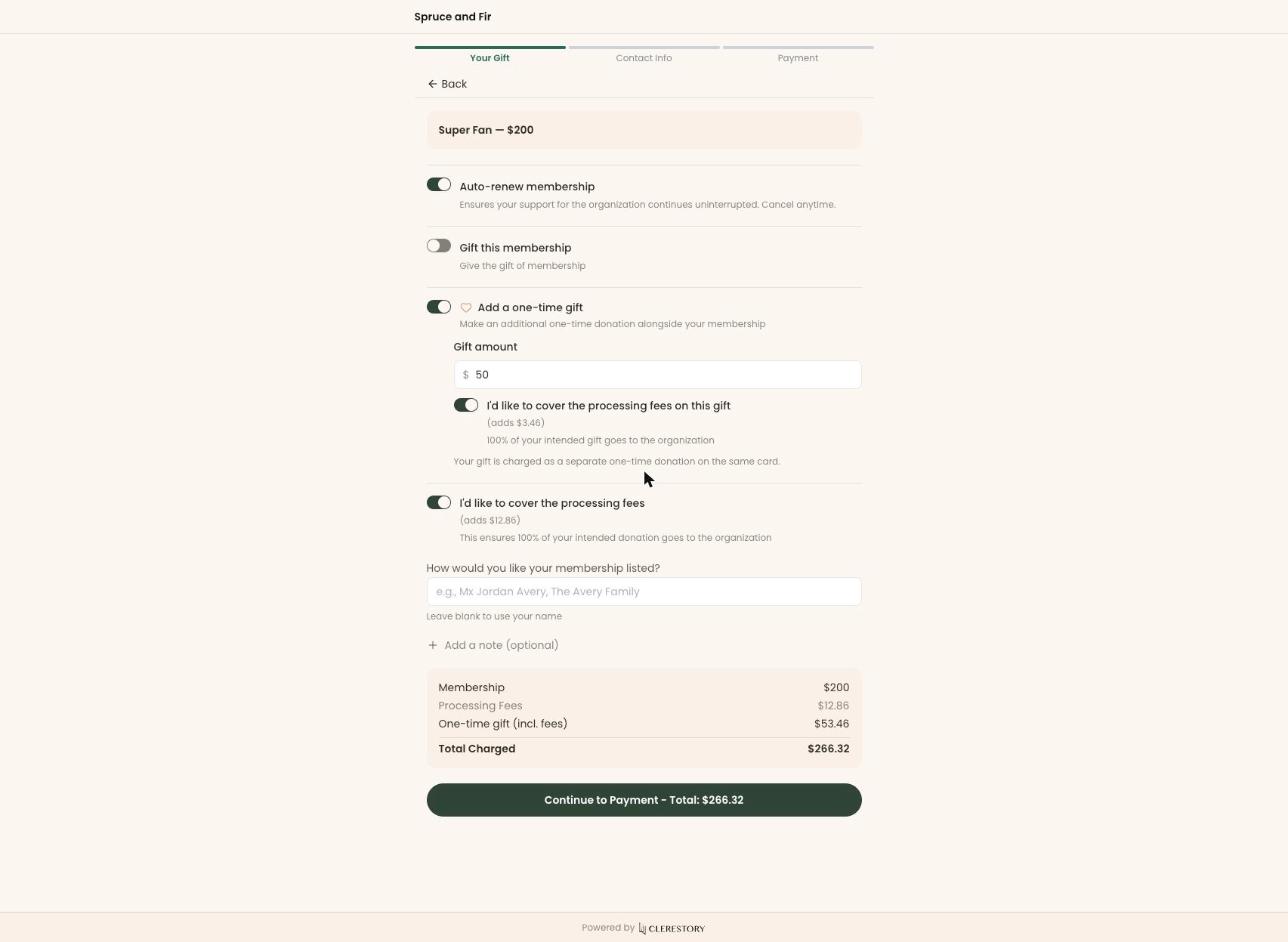
In Clerestory the gift is one-time and does not ride the renewal. Fee coverage does carry into the renewal, because there is a processing fee on every renewal charge, and covering it once while the organization absorbs it every year afterwards would be the wrong behavior.
A museum and its foundation. A society and its endowment. A club and its charitable arm. Two legal entities, two EINs, and every dollar has to land against the right one.
Zeffy documents multiple organizations as multiple accounts: "Every user can be a member of an unlimited amount of organizational accounts." Each is verified separately and holds its own bank account. That works, but it is account switching, not one operation with two entities inside it, and nothing in their documentation describes several EINs issuing distinct receipts within a single account.
In Clerestory each entity is a payment account. It has its own EIN, its own tax classification, its own bank account, and its own tax notice on the receipt. Every campaign routes its revenue to the account you choose, so the gift lands against the right entity and the receipt carries the right EIN at the moment it is sent, rather than being corrected afterwards.
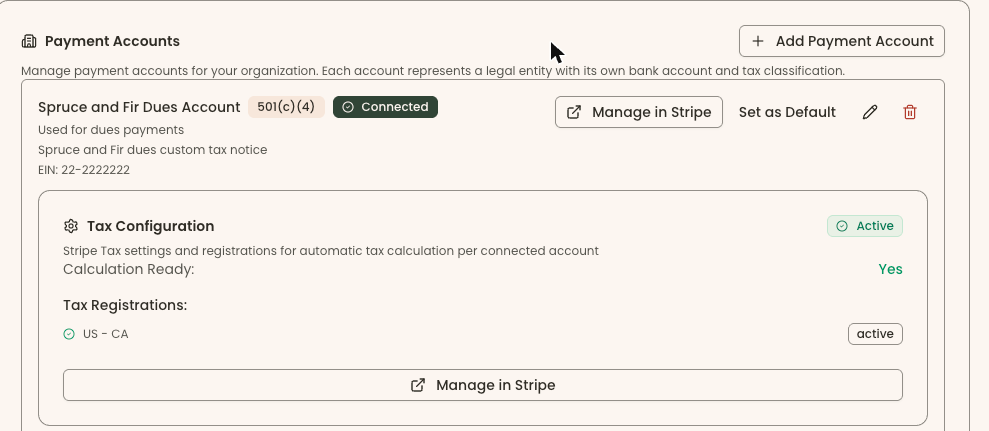
This is the row that matters most to a finance committee and gets the least attention.
Zeffy is explicit that you cannot bring your own: "If you already have a Stripe account, please think of it as completely separate. We cannot connect your existing Stripe account to Zeffy as this would prevent us from covering the transaction fees on your behalf." That is a coherent consequence of their model, not an oversight—they cannot absorb fees on rails they do not control.
In Clerestory, payments are processed on your own Stripe account. Your organization is the merchant of record, the payout schedule is yours, the dispute history is yours, and if you ever leave us the account and its history stay with you.
Zeffy runs online auctions and says plainly where it stops: its own auction page names a gala built around an auctioneer calling live bids as the place it isn't the right tool. It sells raffle tickets, but the draw has to happen somewhere else, and auction items get no automatic tax receipt.
Auctions and raffles are now part of Clerestory, in the same account as memberships, admission and the gift shop. Guests bid on silent items from their own phones, with max bids, buy-now and outbid alerts by email. The auctioneer records live items and paddle-raise levels by bidder number, and a big screen in the room shows the running total and the countdown to each close. After the event every saved card is charged in one batch, with a pay link for anyone left owing. Each guest's statement separates fair market value from the deductible amount, and a paddle-raise gift lands in the donor's giving history as a gift.
Raffles run on their own or inside an event, sold online or at a table. A numbered raffle is drawn inside Clerestory with a cryptographically random pick, and every press of the button is recorded, so a re-draw is visible rather than silent. Raffle money counts as money raised, never as giving, and it is never receipted as deductible.
Memberships and events moved too. Membership rules now cover a shared membership year or a rolling one, a grace period, an early-renewal window, and a longer first term or a lower first price for late joiners. A payment recorded against the wrong thing—a membership paid through the donation form, say—can be moved between membership and donation after the fact without charging anyone again, and the donor receives a corrected receipt that replaces the earlier one. Event offer codes give percent off, an amount off or a fixed price, capped and dated, and signed-in members get member pricing automatically.
Zeffy is a serious product with a genuinely different model, and on nine of the twenty-four rows above it does exactly what we do. If your organization runs on online donations and event tickets, has no gift shop, no admissions desk, no sales tax to collect, no waivers to hold, no second EIN, and no gift larger than $4,999 on a card, then the honest answer is that a lot of what we build is not work you need doing.
The question that actually separates us is not price. It is whether the ask in your checkout should be yours. On Zeffy, your donor is asked twice to contribute to Zeffy, in wording you cannot edit, and about six in ten of them do. That money comes out of the same conversation you are having with that supporter. Some boards consider that an excellent trade for a zero invoice. Others consider the checkout page part of the institution's voice and will not rent it out. Both positions are defensible, and you know which one yours holds better than we do.
If you are large enough that a percentage of everything makes you uneasy, say so early. Our terms already provide for the platform fee to be adjusted or capped at a mutually agreed rate at higher processing volumes, documented in writing between us and published where you can read it before you ever speak to us.
On 3 September 2026 we read Zeffy's own help center and website, and verified every quote above against the live pages in a browser rather than trusting an automated fetch. We did not use G2, Capterra, or any comparison site. We did not treat marketing pages as evidence of what the software does.
On 29 September 2026 we added eleven rows—auctions, raffles, membership rules, moving a payment and event offer codes—and checked each against Zeffy's own help center and website on that date. Where a cell quotes Zeffy, the quote is from Zeffy's own page. On 30 September 2026 we re-read Zeffy's help center article on Electronic Raffle Systems, and the raffle-draw row now quotes its current wording.
Corrected 30 September 2026: Clerestory sells admission by price tier, not by time slot; timed sessions can be sold as an event series.
Screenshots labeled Clerestory are from a Clerestory demo organization with test data. Screenshots labeled Zeffy are from Zeffy's own help center. Every quote is reproduced as it stood on 3 September 2026, including Zeffy's own typographical errors, which we have quoted as written rather than tidied. Documentation moves and products change. If anything here is out of date or wrong, tell us and we will correct it.
Clerestory is an alternative to Zeffy for non-profits that need card readers, sales tax, liability waivers and live auctions, or card payments above $4,999. As of 3 September 2026, Zeffy does not support external card readers, does not automate sales tax on tickets and accepts card payments only up to $4,999.
No. Zeffy charges the organization nothing and covers processing fees, while Clerestory charges 3% per transaction plus Stripe processing. As of 3 September 2026, Zeffy is funded by a voluntary contribution it asks donors for twice at checkout, in wording the organization cannot change, and around 60% of donors contribute.
No. As of 3 September 2026, Zeffy says it is 100% free to non-profits and covers all processing fees. Zeffy's only source of revenue is a voluntary contribution suggested to donors at checkout.
Yes. As of 3 September 2026, Zeffy accepts credit and CVV debit cards for payments up to $4,999, Apple Pay and Google Pay up to $1,000, and bank transfers up to $20,000. Clerestory publishes no ceiling on a single card payment.
Zeffy is free to the organization and covers processing fees itself, which Clerestory does not: Clerestory charges 3% per transaction plus Stripe processing. On a like-for-like online donation, Zeffy costs the organization less than Clerestory.