


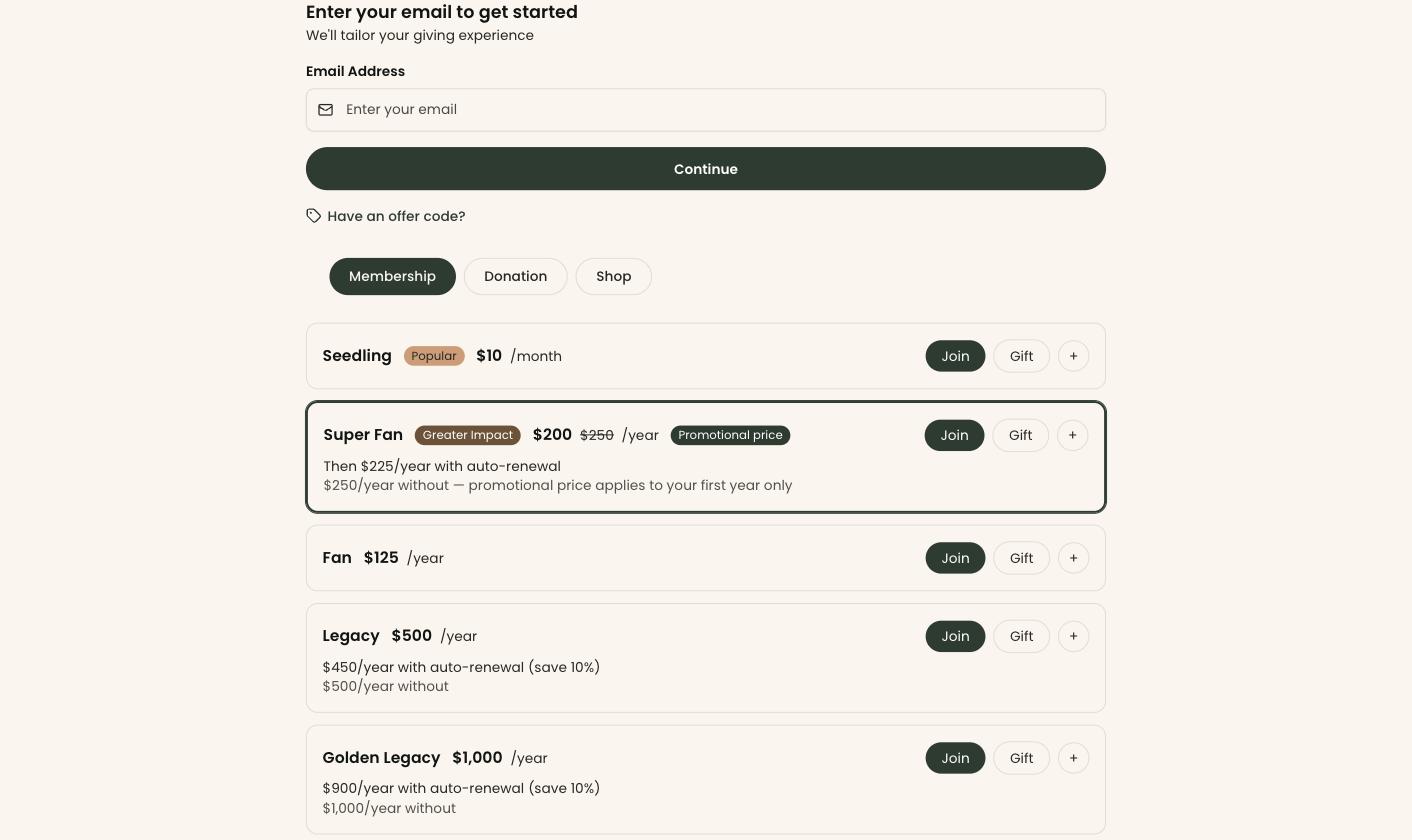
Clerestory: the embeddable membership form, with tiers, monthly and annual pricing and an auto-renewal switch.
Most comparison pages are written by the company that wants to win, and this one is too. So here is how we have tried to make it worth reading: every claim about PatronManager below is quoted from PatronManager's own website or help center, with the date we read it, and where PatronManager does something better than we do, we say so plainly rather than leaving the row out.
Every screenshot on this page is labeled with whose product it shows.
PatronManager is ticketing, fundraising and marketing software for the arts, built as an app on Salesforce. Its help center puts it simply: "PatronManager is a really big app on the Salesforce platform." Its website says it is "Powering CRM and ticketing for 500+ arts organizations", and lists non-profit museums among the organizations it serves, to "Manage admissions, fundraising and visitor engagement in one place". It has recently changed hands: "PatronManager is now part of the Ticketure family", receiving investment from "Ticketure and its parent company, Dahlia Equity Partners", and its FAQ says "Both products will continue to be offered and developed."
Clerestory is payments and a supporter CRM for everything a non-profit sells or collects: admission, memberships and dues, the gift shop, events, galas, auctions, raffles, classes and donations. It is its own software rather than an app on another platform, and every payment lands on the supporter's record as it happens.
PatronManager does not publish a price. On 12 October 2026 its website was a single page with a contact form and no pricing, and the pricing, features and terms addresses we tried returned nothing. Its help center describes per-ticket fees for clients on a fee-based contract, and on rates it says only "consult your contract for specific rates". Its recent change of ownership did not change that: the FAQ says "There are no changes to pricing as part of this transition." and "Your existing contract remains in place."
Two costs sit outside the contract itself. Because PatronManager runs on Salesforce, its help center says "we recommend that all users should have the Salesforce User License". And payments in the US and Canada go through its own merchant service, which is "powered by Stripe": "Our merchant services solution is the only one supported for PatronManager at this time." It does not publish that processing rate. Its help center describes card fees in general as "roughly 3% of the transaction total", and says "No. Credit card processing fees will not be refunded if a transaction is refunded."
We are not going to guess at PatronManager's contract price. Anyone who tells you what it costs without a quote in front of them is making it up.
3% per successful transaction, and that is the whole of our price. No license fee, no per-seat pricing, no modules, no setup fee, no minimum and no contract. Payments run on your organization's own Stripe account, at 2.2% + $0.30, the Stripe non-profit rate our customers receive. Donors and members can choose to cover the fees, and when you refund a payment, our 3% comes back too.
Supporters can cover both fees at checkout, ours and Stripe's. Across every payment we processed through August 2026, our customers paid an effective 1.65% platform fee on our 3% once supporters had covered their share, and about 1.5% in Stripe processing. And through September 2026, 44% of the people paying chose to cover both fees.
3% is a ceiling, not a floor. Our published Terms of Service say: "At higher processing volumes, the platform fee may be adjusted or capped at a mutually agreed rate." For an institution processing more than $800,000 a year online, there are two ways to do that: volume pricing that scales with how many of your donors cover the fees, or contract pricing at an annual rate. Either is agreed in writing before you start.
Read the right-hand column carefully. "Not documented" does not mean PatronManager cannot do it. It means we searched PatronManager's published help center for it on 12 October 2026 and did not find it. PatronManager runs on Salesforce, so a customer may have added an app that does it. If something exists and we missed it, tell us and we will correct this page.
| Capability | Clerestory | PatronManager |
|---|---|---|
| Price published on the vendor's own website | Yes, 3% per transaction | No. PatronManager's website carries no price, and its help center says of its per-ticket fees, "consult your contract for specific rates" (PatronManager Help) |
| Built on Salesforce | No. Clerestory is its own software, so there is no Salesforce org to administer | Yes—"PatronManager is a really big app on the Salesforce platform." (PatronManager Help) |
| Staff user licenses | None. No license fee and no per-seat pricing | Salesforce licenses—"we recommend that all users should have the Salesforce User License" (PatronManager Help) |
| Process payments on your own Stripe account | Yes | No, in the US and Canada—"Our merchant services solution is the only one supported for PatronManager at this time." That solution is "powered by Stripe" (PatronManager Help) |
| General admission | Yes, sold by price tier online and on the kiosk | Yes—"Manage admissions, fundraising and visitor engagement in one place" (patronmanager.com) |
| Timed-entry admission | Partly—admission is sold by price tier, not by time slot; timed sessions with a capacity can be sold as an event series of dated sessions | Yes, built from event instances and time-slot allocations—"Some organizations, especially museums, need to create ticketing to allow patrons to enter at different time frames." (PatronManager Help) |
| Reserved seating | No | Yes—"create a new General Admission or Reserved Seating (Pick Your Own Seat) event in PatronManager" (PatronManager Help) |
| Self-service kiosk | Yes | Not documented |
| Monthly or annual memberships with auto-renewal | Yes | Yes—"With membership auto-renewal, you can drive renewals while saving your staff and members time!" (PatronManager Help) |
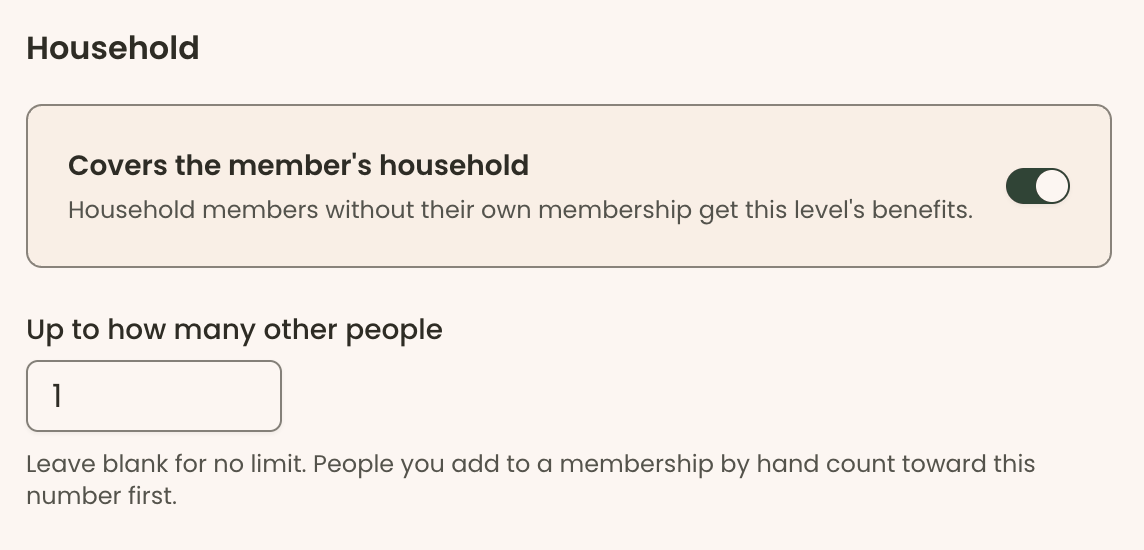
| A household membership with a set number of places, and the member choosing who fills them | Yes | No—"PatronManager Household Memberships cannot:" "Limit the number of Contacts" … "Nor track the names of specific covered members" (PatronManager Help) |
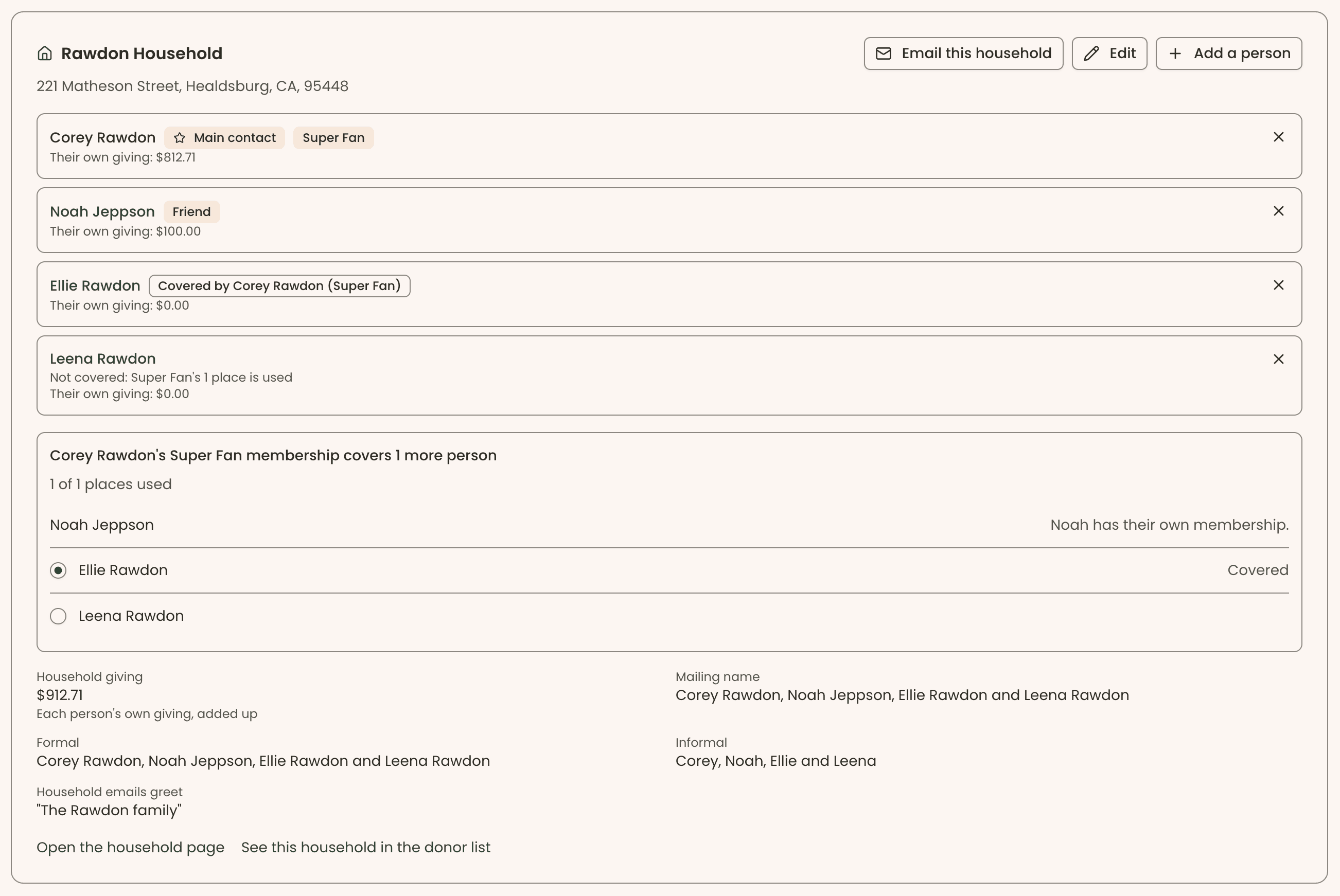
| Covered household members recognized as members at admission | Yes—covered people count as members in lists, reports, admission, the kiosk and Mailchimp | Partly—"Non-Ticketed Member Admission is not fully compatible with Household Memberships." (PatronManager Help) |
| Member self-service portal | Included | Add-on—PatronPortal "will require the purchase of the initial configuration and user licenses for your patrons" (PatronManager Help) |
| Gift shop and retail | Yes, in person and online, with shipping and pickup | Yes—"Selling retail doesn't cost anything extra!" (PatronManager Help) |
| Sales tax | Yes | Yes, at one rate—"No, we don't support multiple tax rates at this time." (PatronManager Help) |
| Galas and ticketed fundraising events | Yes, with sponsorships, waivers and a gala check-in desk | Yes, through donation forms, where gala tickets are recorded as gifts—"they'll be tracked as Donations, rather than as Ticket Orders" (PatronManager Help) |
| Silent and live auctions | Yes, with bidding from guests' own phones and winners charged in one batch | No longer recommended—of Auctions for Salesforce, the auction app its help center documents: "We no longer recommend installing Auctions for Salesforce, but if it is already active in your account, you can continue to use it without issue." (PatronManager Help) |
| Raffles with a draw inside the product | Yes, with every draw recorded | Partly—donation forms can carry "a quantity field for raffle tickets"; no draw is documented (PatronManager Help) |
| Classes | Yes, class registration with waivers | Through CourseStorm—"PatronStorm is a one-way data connector between CourseStorm and PatronManager." It is "Free! (but requires a paid CourseStorm account)" (PatronManager Help) |
| Liability waivers signed at registration | Yes | Not documented |
| Supporter engagement score with a reason for every point | Yes, called Warmth, scored 0–100 with a 90-day trend | Not documented |
| Households where each person keeps their own record and giving history | Yes | Yes—"Their individual ticket purchases and donation contributions stay separate on each respective Contact" (PatronManager Help) |
| Multi-step automations | Yes, started by a gift, joining, renewing, lapsing, a first visit, event attendance, a tribute gift or reaching a donor level | Yes, built in Salesforce—"Flow is a Salesforce tool for automation" (PatronManager Help) |
| Duplicate matching and merge | Yes, matched nightly, merged field by field, with undo for 30 days | Yes, through Salesforce Duplicate Management, with a caution—"Warning: setting duplicate management up incorrectly can break PatronManager." (PatronManager Help) |
| Tribute gifts with family notification | Yes | Not documented |
| Volunteer shifts and hours | Yes | Through a separate Salesforce app—PatronManager's help center names "Volunteers for Salesforce (V4S)" among the apps customers add (PatronManager Help) |
| Grant tracking | Yes, with awards flowing into the ledger | Yes—the New Grant action "allows you to create a Grant record from the Account record" (PatronManager Help) |
| Built-in email with open and click tracking | Yes, on appeals and newsletters | Through a separate email platform—"Emma, Campaign Monitor, and Mailchimp are all equally compatible", connected by integrations "built by a separate company called Beaufort 12" (PatronManager Help). PatronManager's own List Emails "are not a replacement for your email marketing services" (PatronManager Help) |
| Soft credits | Yes | Yes—"Soft credit records are the best way to give benefits and recognition for help on bringing in a donation." (PatronManager Help) |
| LYBUNT and SYBUNT lists | Yes | Yes—"you can use the CRM Snapshot called LYBUNT/SYBUNT" (PatronManager Help) |
| Custom reports and dashboards | Yes, a People report with include and leave-out groups and saved lists | Yes, Salesforce's report builder—"you can transform the information from a report into a colorful chart" (PatronManager Help) |
| Bookkeeper and treasurer reports | Yes—restricted and unrestricted funds, a treasurer's report, Schedule B, giving statements, closed months and a journal CSV | Yes, financial reports, including "Audit-friendly reports" (PatronManager Help) |
| QuickBooks Online | Yes | Not documented |
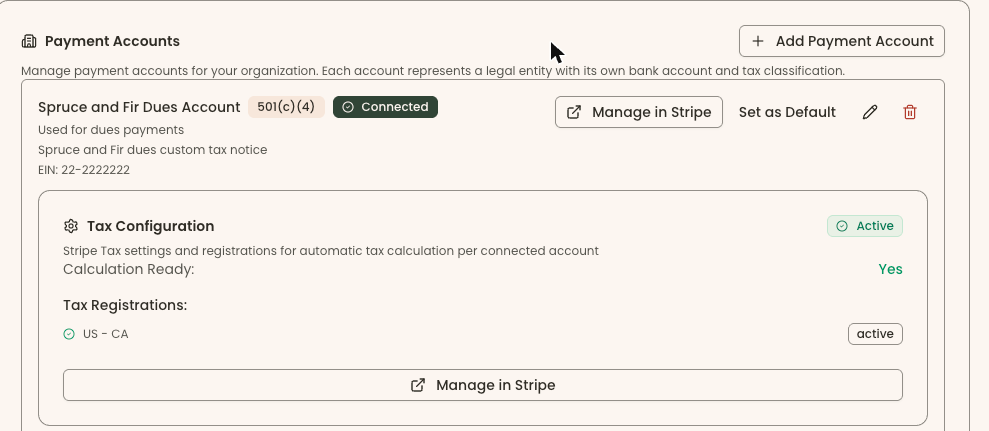
| Several 501(c) entities, each with its own EIN, bank account and receipts | Yes | Not documented |
| Wealth screening | No | Through a paid app—DonorSearch "Starts at $209/month as of June 2026" (PatronManager Help) |
| Text messaging to supporters | No | Through an app—Mogli SMS, "intelligent texting technology built directly into the Salesforce platform" (PatronManager Help) |
| Pledge tracking | Yes, with payment schedules, automatic card payments and an Outstanding Pledges report | Yes—"you'll learn how to use Pledges in PatronManager" (PatronManager Help) |
Read the "No" rows in our column as carefully as the others. PatronManager does reserved seating, which we do not, and timed entry in full, which we do only in part. Through Salesforce apps it can add wealth screening and text messaging, which we do not offer. On households, automations, duplicates, grants, soft credits, LYBUNT and SYBUNT lists, reports, financial reports, auto-renewing memberships, pledges, retail and sales tax, both products do the job.
For a museum, this is the row worth reading twice. A family membership is usually sold as a number of places: two adults, or two adults and their children, or a named member plus one guest. The membership has to know who those people are, so they are recognized at the door and counted as members in your reports.
PatronManager's help center is direct about what its Household Memberships do. A household membership applies its benefits to the whole Salesforce Account, and its FAQ lists what it cannot do: "Limit the number of Contacts", specify adults versus children, or record who is covered—"Nor track the names of specific covered members". Its member admission app adds: "Non-Ticketed Member Admission is not fully compatible with Household Memberships."
In Clerestory each membership level sets whether it covers a household and how many other people it covers. If there are more people in the household than places, the member chooses who is covered, in their own portal. Covered people count as members everywhere: in lists, reports, admission, the kiosk and Mailchimp. Staff can add named members too, and a gift membership makes the recipient the member, with the renewals going to them.
PatronManager is a mature product with real depth, and a museum that is happy on it has good reasons to be.
Seating and timed entry. PatronManager documents reserved seating with venue maps, held and reallocated seats and accessible seating, and timed entry built from events and time-slot ticket allocations. Clerestory does not do reserved seating, and sells timed sessions only as an event series. If your galleries, theater or auditorium depend on seat maps, PatronManager does something we do not.
The Salesforce platform. Because PatronManager is an app on Salesforce, a customer with a skilled administrator gets Salesforce's report builder and dashboards, custom fields and objects, Flow automation, sandboxes for testing changes, and the Salesforce app ecosystem: DonorSearch for wealth screening, Mogli for text messaging and many others. For an institution that already has Salesforce expertise on staff, that flexibility is genuinely valuable.
Performing arts and fundraising depth. Subscriptions and season packages, renewal tools, moves management and a certified administrator program are all documented. Its help center lists more than 700 articles, webinars and release notes.
No Salesforce to administer. PatronManager's flexibility comes with the work of running a Salesforce org: user licenses, page layouts, profiles, sandboxes and careful setup. Its own help center warns, of duplicate management, "Warning: setting duplicate management up incorrectly can break PatronManager." Clerestory has no org to administer. Duplicates are matched nightly and merged field by field, and a merge can be undone for 30 days.
Fundraising events in the same checkout. Silent and live auctions, paddle raises and raffles are part of Clerestory, in the same account as memberships, admission and the gift shop. Guests bid from their own phones, winners are charged in one batch from saved cards, and a raffle is drawn inside the product with every draw recorded. PatronManager's help center says of the auction app it documents, "We no longer recommend installing Auctions for Salesforce", and its raffle guidance is a quantity field on a donation form.
Membership dues and household places. Each level sets its own household places, and members choose who fills them, as above.
More than one legal entity. A museum and its foundation, or a museum and a friends' group, can run in one Clerestory account. Each entity is a payment account with its own EIN, tax classification, bank account, receipts and QuickBooks class, and every campaign routes its revenue to the account you choose. We searched PatronManager's help center for legal entities, tax IDs and multiple bank accounts and found nothing on running more than one.
Email, waivers, the kiosk and the books, built in. Appeals and newsletters send from Clerestory with open and click tracking, where PatronManager connects to Emma, Campaign Monitor or Mailchimp. Liability waivers, a self-service kiosk, tributes with family notification, volunteer shifts and hours, QuickBooks Online and bookkeeper reports for restricted and unrestricted funds, Schedule B and a journal export are all part of the product.
A price you can read before you call. 3% per transaction, a ceiling not a floor, on your own Stripe account, with volume or annual contract pricing above $800,000 a year.
If your institution runs PatronManager well, has Salesforce administrators who keep it that way, and depends on reserved seating or full timed entry, PatronManager may be serving you well, and we would not tell you otherwise.
The case for Clerestory starts with the list of things you would change. If that list includes family memberships that know who is covered, auctions and raffles in the same checkout as admission and dues, a foundation or second 501(c) with its own receipts, email that does not need a separate platform, or less time spent administering Salesforce, those are the rows above where Clerestory does the work and PatronManager either does not document it or sends you to another product.
Then ask both of us the same two questions: what does the software cost, user licenses included, and what does the card processing cost, each on its own line? Ours are 3% and 2.2% + $0.30, and your supporters can cover both. PatronManager publishes neither.
On 12 October 2026 we read PatronManager's own website and its public help center at help.patronmanager.com. We listed every public article in its help center's categories, more than 700 including webinars and release notes, and searched their text for each capability in the table. Every quote on this page was checked word for word against the live page in a browser on that date, and each row links to the page it quotes.
Where a row says "Not documented", these are the searches that found nothing relevant: kiosk; waiver; tribute, in honor and in memory; engagement score; QuickBooks; legal entity, tax ID and multiple bank accounts. We also tried to read PatronManager's Salesforce AppExchange listing, but could not retrieve its text, so nothing on this page relies on it. We did not use G2, Capterra or any comparison site.
Screenshots labeled Clerestory are from a Clerestory demo organization with test data. Documentation moves and products change. If anything here is out of date or wrong, tell us and we will correct it.
For a museum that sells general admission, memberships, a gift shop, events and donations, yes. Clerestory does those, plus household memberships with a set number of places, auctions, raffles, a self-service kiosk, liability waivers and several 501(c) entities in one account, for 3% per transaction with no license fee and no contract. It does not do reserved seating, and it does timed entry only in part: admission is sold by price tier, and timed sessions with a capacity are sold as an event series. As of 12 October 2026 PatronManager documents both reserved seating and timed entry.
PatronManager does not publish a price. As of 12 October 2026 its website carries no pricing, its help center tells customers on fee-based contracts to consult their contract for per-ticket fee rates, and it recommends a Salesforce user license for every staff user. Clerestory charges 3% per transaction on the organization's own Stripe account, with no license fee, no per-seat fee and no contract, and organizations processing more than $800,000 a year online can choose volume pricing or contract pricing at an annual rate.
Yes. As of 12 October 2026 PatronManager's help center documents reserved seating, which it calls Pick Your Own Seat, and a best-practices article on building timed entry from events and time-slot ticket allocations. Clerestory does not do reserved seating, and does timed entry only in part, by selling timed sessions with a capacity as an event series of dated sessions.
No. Clerestory is its own software, so there is no Salesforce org to administer, no Salesforce user licenses to buy and no sandbox to test changes in. PatronManager is built on Salesforce, and its help center recommends that every user has a Salesforce user license.
Reserved seating and timed entry in full. Because it is built on Salesforce, PatronManager customers can also add apps from the Salesforce ecosystem, such as DonorSearch for wealth screening and Mogli for text messaging, and use Salesforce's report builder, dashboards and Flow automation. As of 12 October 2026 Clerestory offers none of reserved seating, wealth screening or text messaging.