


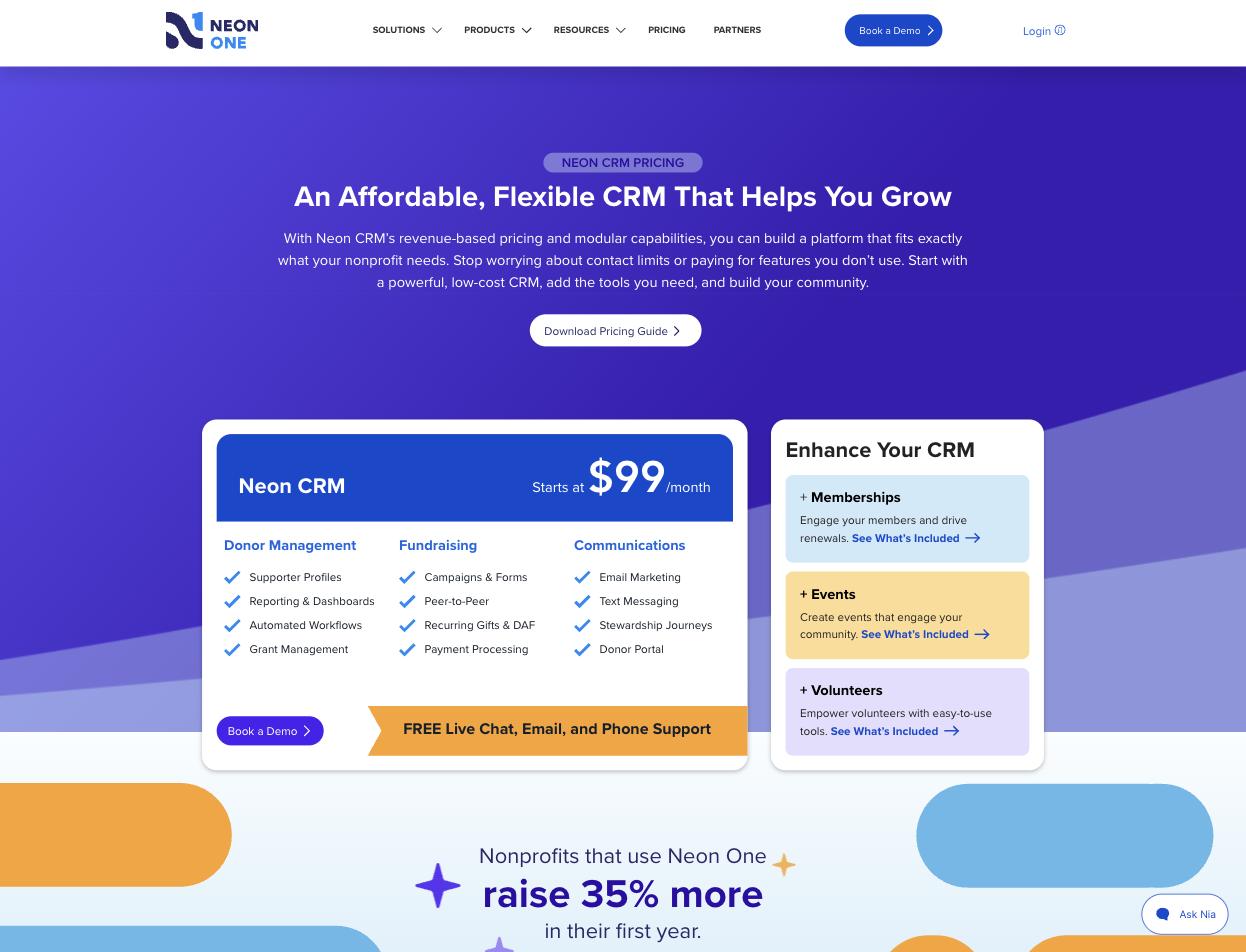
Neon One: the Neon CRM pricing page, read on 4 September 2026, showing a $99/month starting price and three capabilities—Memberships, Events and Volunteers—sold as separately priced add-on modules.
Most comparison pages are written by the company that wants to win, which is why almost none of them are useful. This one is too, so here is how we have tried to make it worth reading: every claim about Neon CRM below is quoted from Neon One's own website, with the date we read it, and where Neon matches us we say so plainly rather than leaving the row out.
There are a lot of those rows on this page. Neon CRM matches us on ten of the twenty-seven capabilities below. If you are evaluating Neon CRM, you are evaluating a serious product, and this page is not going to pretend otherwise.
Every screenshot on this page is labeled with whose product it shows.
Neon publishes a starting price, which is more than several vendors on this list manage. Their pricing page says Neon CRM "Starts at $99/month", and their FAQ explains the model: "The price for Neon CRM starts at $99 per month, but the total cost for a given nonprofit will mostly depend on two main factors: revenue and additional features."
Revenue-based, not record-based, and they make a fair case for it: "Revenue-based pricing means that your subscription fee for Neon CRM is based on how much money you're bringing in." Unlimited contacts, unlimited users, and no penalty for adding records. For an organization that has been deleting constituents to stay under a tier cap, that is a real and welcome difference, and we will not pretend otherwise.
What is not published is the rest of the curve. There is no table of revenue bands, so $99 is a floor with no visible ceiling.
Three capabilities are not in the base product. In Neon's own words:
"The platform also includes three optional add-on modules for Memberships, Events, and Volunteers, all of which come with an additional fee based on a percentage of your CRM subscription fee: +10% for Memberships and Volunteers, +20% for Events."
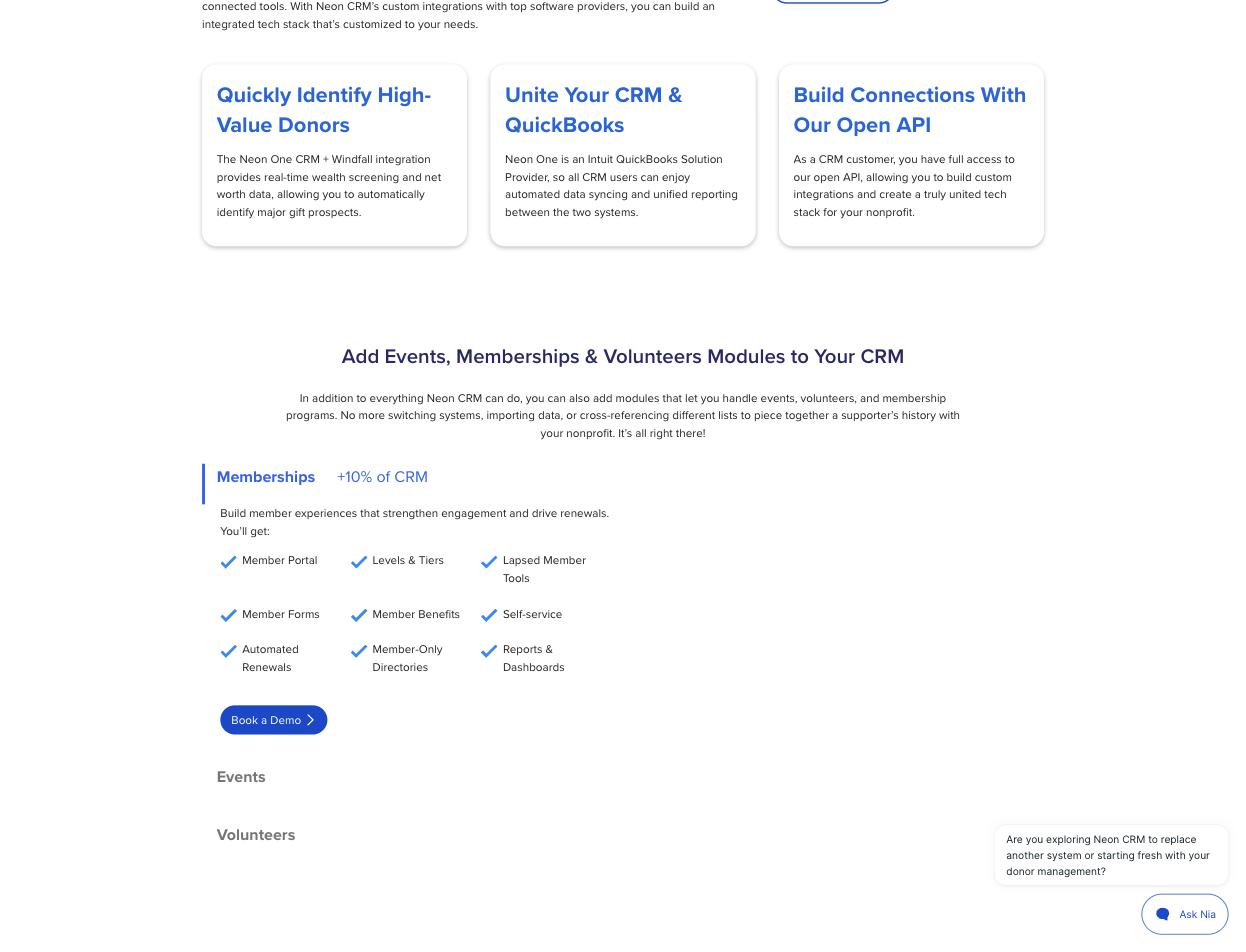
Read that structure carefully, because it compounds. The module surcharge is a percentage of the CRM subscription fee, and the CRM subscription fee is itself based on your revenue. So a museum that runs memberships and events pays +30% on a base that rises as it raises more. Grow, and both halves grow together.
This is not a hidden fee. Neon publishes it, and publishing it is to their credit. It is a structure worth modeling before you sign, because the number you are quoted in year one is not the number you will be paying in year four.
Here is the whole of what Neon publishes about what it costs to take a card payment through Neon Pay.

The list is precise about the small things and silent about the large one:
| Published | Amount |
|---|---|
| Merchant Account Fee | $6.99 per month |
| External Processor Support Fee | $50/month |
| Retrievals & Chargebacks | $20.00 per transaction |
| ACH Rejects/Returns | $15.00 per transaction |
| Surcharge for American Express | 1% |
| PayPal/Venmo Rates | 3.25% + $.35 per transaction |
| Daily payouts | 0.50% per payout |
| Credit and debit card rate | Not published |
Neon publishes a "Surcharge for American Express: 1%". A surcharge is one percent added to a base rate, and the base rate does not appear on the page. We read the whole document and extracted every percentage and every dollar figure in it; the ones above are all of them.
Their Terms name the missing number without giving it. Section 2.2 says funds are disbursed "less any refunds, chargebacks, and any applicable fees including Neon Pay Processing Fees (as defined below)." That phrase appears exactly once on the page, and there is no definition below it.
Their pricing FAQ asks the question directly. The heading reads "What is Neon Pay and How Much Does it Cost?" The answer describes real-time payment data, automatic reconciliation, flexible payouts and digital wallets. It contains no price.
We are not suggesting anything improper. Payment pricing is often quoted per customer, and plenty of vendors do it this way. But the same pricing page promises "without hidden costs or record caps getting in your way", and for most non-profits the card rate is the largest single line in the bill.
This is the sentence to carry through every comparison on this site: a published processing rate is not a price. When Givebutter or Funraise publishes "2.9% + $0.30", that is what the card costs; the software sits on top of it. Neon has the mirror-image gap—they publish what the software costs and not what the card costs.
Two halves, two vendors, one number missing each time. Ours is the whole thing, which is the only reason we can put it in a sentence.
3% per transaction, and that is the whole of our price. No license fee, no per-seat pricing, no modules, no support tiers, no minimum, no contract, and no separate charge for memberships, events or volunteers. Stripe processes the payment on your own Stripe account at 2.2% + $0.30, the non-profit rate our customers receive.
Supporters can cover both fees at checkout, ours and Stripe's. Across every payment we processed through August 2026, our customers paid an effective 1.65% platform fee on our 3% once supporters had covered their share, and about 1.5% in Stripe processing.
There is no merchant account fee, no charge for taking daily payouts instead of weekly, no surcharge for using your own processor, and no module that switches memberships on.
Our platform fee is a ceiling rather than a floor. Our published Terms of Service say so: "At higher processing volumes, the platform fee may be adjusted or capped at a mutually agreed rate."
Neon's Terms of Service are worth ten minutes before a demo. Read on 4 September 2026:
None of this is unusual for enterprise software. It is worth knowing that it applies, because a revenue-based fee on a twelve-month auto-renewing term means the good year you have in year two is priced in year three.
Clerestory has no term, no minimum and no auto-renewal, because there is nothing to renew. You pay 3% of what you process. If you process nothing, you pay nothing.
Read the right-hand column carefully. "Not published" does not mean Neon CRM cannot do it. Most of Neon's product documentation sits behind a customer login, so this table is built from what Neon publishes publicly. Where a capability is documented only behind that login, we have credited it to Neon rather than counted it against them. If we have a row wrong, tell us and we will correct this page.
| Capability | Clerestory | Neon CRM |
|---|---|---|
| Price published on the vendor's own website | Yes, 3% per transaction, all in | Partly—$99/month starting, plus +10%/+20% modules; no revenue bands and no card rate published |
| Process on your own Stripe account | Yes, at no extra charge | A "third party payment processor supported by Neon One" is allowed, at an External Processor Support Fee of $50/month; Stripe is not named |
| Donor option to cover processing fees | Yes | Yes—Donor Covered Fees, and an organization can have the checkbox preselected |
| Card readers and in-person hardware | Yes | Yes—a "Bluetooth- and 4G-enabled payment terminal powered by Neon Pay" |
| Walk-up point of sale | Yes | Yes—the same terminal, marketed for onsite event sales |
| Optional donation added to a ticket purchase | Yes | Yes—an add-on donation on event registration forms |
| Optional donation added to a membership purchase | Yes, one-time, on the same checkout | Not published—we found an add-on donation documented for events, and no equivalent for membership checkout |
| Memberships as a product with a term and expiry | Yes, included | Yes—levels and tiers, automated renewals and lapsed member tools, in a module at +10% of the CRM fee |
| Timed-entry admission | Partly—walk-up admission is sold by price tier, not by time slot; timed sessions with a capacity can be sold as an event series of dated sessions | Not published—events carry attendee limits, waiting lists and seating charts, and we found no date-and-time slot with its own capacity |
| Sales tax on retail items | Yes, built in | Yes—via their TaxJar integration, "real time sales tax calculations at checkout in the Neon CRM online store" |
| Online store or gift shop | Yes | Yes—Neon's own integrations page refers to "the Neon CRM online store" |
| Retail inventory reduced automatically by a sale | Yes | Yes—documented in their store articles, which sit behind their customer login |
| Self-service kiosk | Yes | Not published—a search of their public help center for "kiosk" returns nothing |
| Liability waiver captured at registration | Yes—versioned, required before payment, with signer, timestamp, IP and version hash recorded | Yes—an event waiver statement a registrant must agree to before completing registration |
| Correct tax receipt per 501(c) entity, per transaction | Yes | Not published—we found nothing stating that one Neon CRM subscription carries more than one EIN onto its own receipts |
| Class or workshop registration | Yes, in the product | In Arts People, a separate Neon One product at $.99 per ticket + transaction fees; the CRM events module lists a class as an event type |
| Silent auction with bidding from the guest's own phone | Yes—max bids, buy-now and outbid alerts by email | Through a partner—ClickBid, listed by Neon One as a certified integration |
| Live auction and paddle raise recorded by bidder number | Yes—the auctioneer screen shows the winner's name as the number is typed | Not published |
| Winners charged in one batch from cards saved at purchase or check-in | Yes—plus a pay link for anyone left owing | Not published |
| Auction receipts showing fair market value and the deductible amount | Yes | Not published |
| Raffle tickets sold online and at a table | Yes—singles or bundles, such as 10 for $40 | Not published |
| Random raffle draw inside the product, with every draw recorded | Yes—a cryptographically random pick, and refunded tickets cannot win | Not published |
| Raffle money kept out of giving history and never receipted as deductible | Yes | Not published |
| Move a payment between a membership and a donation, with a corrected receipt | Yes | Not published—Neon's help center requires a customer login |
| Membership grace period, and a longer first term or lower first price for late joiners | Yes | Not published—Neon's help center requires a customer login |
| Offer codes on event tickets | Yes—percent off, amount off or a fixed price, with caps and date windows | Yes—discount codes, in the Events add-on |
| Member pricing applied automatically at event checkout | Yes | Partly—a help article covers discounts for members on legacy events; its content is behind a login |
Clerestory does twenty-six of the twenty-seven in full and timed entry in part. Neon CRM matches us on ten. Their store is real, their memberships are real, their sales tax is real, their payment hardware is real, and their support is genuinely free—their FAQ answers "Do I Have to Pay Extra for Customer Support?" with "No!", including live chat and phone. That is not nothing; several vendors on this list charge for it.
Neon One sells more than one product, and the difference matters when you are pricing a museum or a theater.
Neon CRM is the donor database with modules bolted on. Arts People is their ticketing and box-office product, priced separately at "$.99 per ticket + transaction fees", and it is where class enrollment lives. If your evaluation involves both a donor database and a ticketed door, you are pricing two products and the seam between them, which is the same shape as Raiser's Edge NXT and Altru.
In Clerestory the admission, the membership, the class, the gift shop item and the donation are one transaction, on one receipt, in one system, at one rate.

This is the Clerestory kiosk mid-transaction. Six of the rows above are visible in one screen.

Neon CRM has the membership, the store, the stock count and the sales tax. What we did not find published is the unattended screen a visitor uses themselves.
We looked for this specifically and did not find it published: whether one Neon CRM subscription can carry two legal entities, each putting its own EIN on its own receipts. Their documentation on receipts sits behind the customer login, so treat this as a question to ask them rather than an answer.
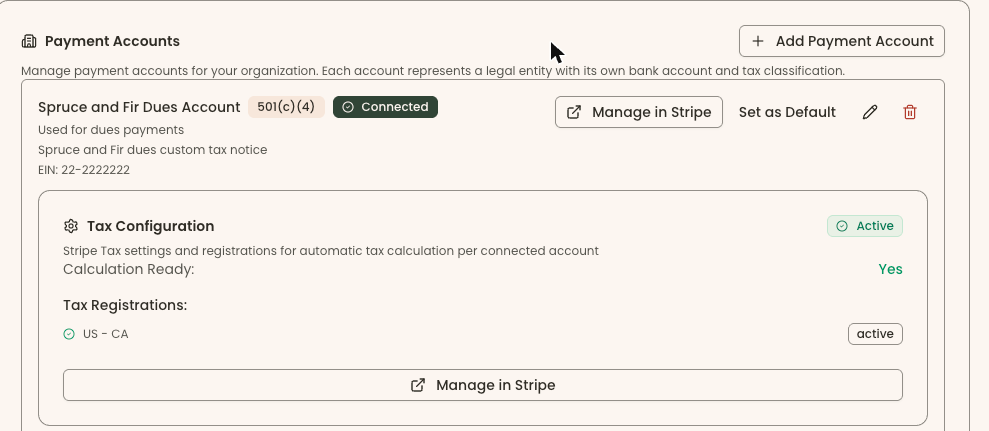
In Clerestory each entity is a payment account. Its own EIN, its own tax classification, its own bank account, and its own tax notice on the receipt. Every campaign routes revenue to the account you choose, so the gift lands against the right entity and the receipt carries the right EIN at the moment it is sent.
Neon CRM does not document an auction or a raffle of its own. Its route to mobile bidding is a partner, ClickBid, which Neon One lists as a certified integration, and we found no raffle feature on Neon One's site. Neon's help center now sits behind a customer login, so where a row depends on it we say so rather than guess.
Auctions and raffles are now part of Clerestory, in the same account as memberships, admission and the gift shop. Guests bid on silent items from their own phones, with max bids, buy-now and outbid alerts by email. The auctioneer records live items and paddle-raise levels by bidder number, and a big screen in the room shows the running total and the countdown to each close. After the event every saved card is charged in one batch, with a pay link for anyone left owing. Each guest's statement separates fair market value from the deductible amount, and a paddle-raise gift lands in the donor's giving history as a gift.
Raffles run on their own or inside an event, sold online or at a table. A numbered raffle is drawn inside Clerestory with a cryptographically random pick, and every press of the button is recorded, so a re-draw is visible rather than silent. Raffle money counts as money raised, never as giving, and it is never receipted as deductible.
Memberships and events moved too. Membership rules now cover a shared membership year or a rolling one, a grace period, an early-renewal window, and a longer first term or a lower first price for late joiners. A payment recorded against the wrong thing—a membership paid through the donation form, say—can be moved between membership and donation after the fact without charging anyone again, and the donor receives a corrected receipt that replaces the earlier one. Event offer codes give percent off, an amount off or a fixed price, capped and dated, and signed-in members get member pricing automatically.
Neon CRM is a close competitor, and on capability it is a fair fight. If what you need is a strong donor database with memberships, events, an online store and free phone support, Neon CRM does that, and the revenue-based model is a genuine relief for an organization that has been pruning records to stay under a cap.
Three questions decide it the other way.
Can you find out what it costs? $99 is a floor. The modules add +10%, +20% and +10% of a fee that itself rises with your revenue. And the card rate—usually the biggest line—is not published anywhere, including in the FAQ that asks the question. Ours is 3%, it is the whole price, and it is on the page.
How long are you committing for? Twelve months by default, auto-renewing, non-cancelable, with a right to raise fees once a year mid-term and again at renewal. We have no term at all.
Does the institution have a door? A self-service kiosk, a class in the same system as the membership, an add-on gift on a membership renewal, and two EINs on two sets of receipts are the things we could not find published on Neon's side. If most of that describes your week, the ticketed half of your operation is a second Neon One product with its own per-ticket price.
If you are large enough that a percentage of everything makes you uneasy, say so early. Our terms already provide for the platform fee to be adjusted or capped at a mutually agreed rate at higher processing volumes, documented in writing between us and published where you can read it before you ever speak to us.
On 4 September 2026 we read Neon One's own pricing page, Neon CRM pricing page, NeonPay Terms of Service, Terms of Service, event management page and TaxJar integration page, and verified every quote and every figure above against the live pages in a browser rather than trusting an automated fetch. We did not use G2, Capterra, or any comparison site.
On 29 September 2026 we added eleven rows—auctions, raffles, membership rules, moving a payment and event offer codes—and checked each against Neon One's own website and developer documentation on that date. Where a cell quotes Neon CRM, the quote is from Neon CRM's own page.
One methodological note we want to be open about. Most of Neon's product documentation requires a customer login. Their public help center returns no results for "sales tax" even though Neon's own integrations page documents real-time sales tax in the Neon CRM store—so for Neon, a help-center search returning nothing proves nothing, and we have not used one as evidence of absence. Every row we credit to Neon, we credit. Every row marked "not published" means we could not find it on the public web, not that it does not exist.
The base card rate is the one exception where absence is the finding, because we read the entire NeonPay Terms of Service, extracted every percentage and dollar figure in it, and the rate is not among them.
Corrected 30 September 2026: Clerestory sells admission by price tier, not by time slot; timed sessions can be sold as an event series.
Screenshots labeled Clerestory are from a Clerestory demo organization with test data. Screenshots labeled Neon One are from Neon One's own website. Every quote is reproduced as it stood on 4 September 2026. Documentation moves and products change. If anything here is out of date or wrong, tell us and we will correct it.
Clerestory is an alternative to Neon CRM that includes memberships, events, admission, the gift shop, auctions and raffles in one price of 3% per transaction, with no modules and no contract. As of 4 September 2026, Neon CRM starts at $99 per month, and memberships, events and volunteers are add-on modules priced as a percentage of that subscription.
The comparison cannot be completed from published numbers, because Neon does not publish its credit card rate for Neon Pay or its revenue bands above the $99 monthly starting price, as of 4 September 2026. Clerestory publishes both of its fees: a 3% platform fee, and Stripe processing at 2.2% + $0.30, and supporters can cover both.
Neon CRM's published price is a subscription that starts at $99 per month and rises with the organization's revenue, plus +10% for Memberships, +20% for Events and +10% for Volunteers, as of 4 September 2026. Neon Pay also lists a $6.99 monthly merchant account fee and a $50 monthly fee for using an outside processor, but the base card rate is not published.
Yes. As of 4 September 2026, Neon's own pricing says Memberships and Volunteers are add-on modules at +10% of the CRM subscription fee and Events at +20%, and that subscription fee is itself based on revenue. Clerestory has no modules and no separate charge for memberships, events or volunteers.
Yes. As of 4 September 2026, Neon One's Terms of Service set a default twelve-month term that renews automatically unless notice is given at least thirty days before it ends, with payment obligations that are non-cancelable. Clerestory has no term, no minimum and no auto-renewal.
On the twenty-seven capabilities this comparison checked, none: Clerestory does twenty-six in full and timed entry in part, and Neon CRM matches on ten, including memberships, an online store, sales tax and payment hardware. Neon's revenue-based pricing also gives unlimited contacts and unlimited users, and its FAQ says customer support, including live chat and phone, costs nothing extra.