


Until now, putting it right usually meant refunding the payment and asking the person to pay again the right way. That costs processing fees twice, confuses the donor and leaves a trail of refunds in your reports. Now it takes a minute.
Where to find it
Open the payment from the donor's timeline and choose Move to membership or Move to donation under Correct. You will also find a Move button beside Refund on donation and membership rows in the payments list.
Moving a donation to a membership
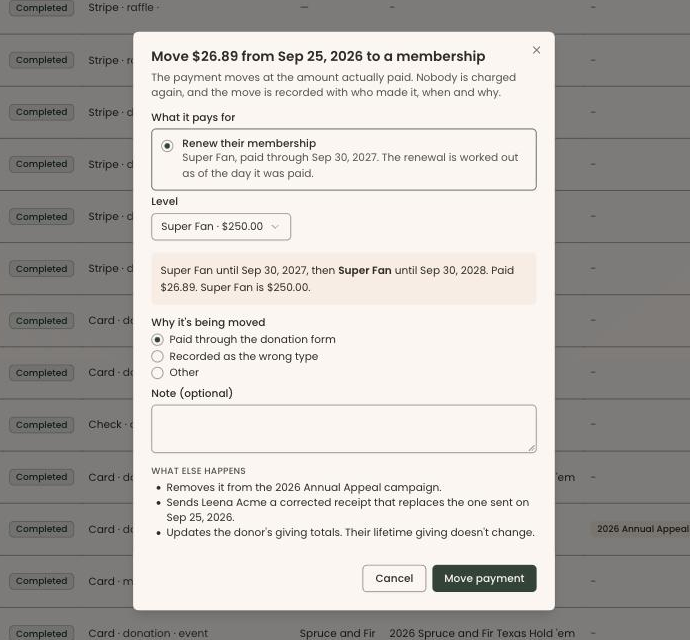
Choose what the payment pays for:
- A membership that was recorded free. The payment is linked to it, and the dates and level stay as they are.
- Renew their membership. The renewal is worked out as of the day they paid, not today, so a correction made weeks later still gives them the dates they would have had.
- Start a membership, at the level you choose, starting on the day they paid.
If the amount does not match the level's price, the move is still allowed, and the membership is recorded at what they actually paid.
Moving a membership payment to a donation
Decide what happens to the membership period it paid for: End the membership period, or Keep it as a free membership with a note saying why. If another payment also covered that period, it simply stays in place. The payment becomes a one-time donation and keeps any campaign it was already linked to.
What happens, and what does not
- Nobody is charged again. The money does not move. The payment keeps its amount and fees, and your payment processor is not touched.
- Lifetime giving does not change. Only the split between donations and memberships moves, and the donor's totals and member status update straight away.
- The donor gets a corrected receipt. It says plainly that it replaces the earlier receipt and gives that receipt's date. A corrected membership receipt includes the level's fair market value, and a corrected donation receipt uses your gift wording.
- Your other systems follow. Reports update, Mailchimp is re-synced, and if the payment was already posted to QuickBooks, the entry there is corrected.
Before you confirm, the dialog tells you exactly what else will happen, including a warning if the donor has no email address and so cannot be sent a corrected receipt.
Every move is on the record
You choose why the payment is being moved, such as "Paid through the donation form" or "Recorded as the wrong type", and every move records who made it, when and why. The donor's timeline shows the correction. If you move a payment back, Clerestory undoes the earlier move exactly, putting everything back as it was, and it will not undo blindly if the membership has changed since.
What it will not move
A few payments cannot be moved, and Clerestory tells you why instead of letting a correction go wrong. They include payments that are refunded, disputed or not yet settled, imported history, gift memberships, auction and gala charges, and renewals for a member on auto-renew. For those, turn off auto-renew first. Only donations and memberships can be moved, and a payment moves whole. It cannot be split between the two.
What it costs
Nothing, and that is rather the point: no refund, no second charge and no second set of processing fees.
Frequently asked questions
What should a non-profit do when a member renews through the donation form?
In Clerestory, open the payment from the donor's timeline and choose Move to membership under Correct. The payment can pay for a membership recorded free, renew the membership as of the day the member paid, or start a new membership, and nobody is charged again.
Can I change a donation into a membership payment without a refund?
Yes. Clerestory moves the payment without a refund or a second charge: the payment keeps its amount and fees and the payment processor is not touched, so there is no second set of processing fees. The move itself costs nothing.
Does the donor get a corrected receipt when a payment is moved?
Yes. When Clerestory moves a payment between a membership and a donation, the donor gets a corrected receipt that says plainly it replaces the earlier receipt and gives that receipt's date. A corrected membership receipt includes the level's fair market value, and a corrected donation receipt uses the organization's gift wording.
Does moving a payment change a donor's lifetime giving?
No. In Clerestory only the split between donations and memberships moves, so lifetime giving does not change. Reports update, Mailchimp is re-synced, and a payment already posted to QuickBooks is corrected there.
Which payments can't be moved between a membership and a donation in Clerestory?
Clerestory will not move payments that are refunded, disputed or not yet settled, imported history, gift memberships, auction and gala charges, or renewals for a member on auto-renew. A payment moves whole and cannot be split between a membership and a donation.